
Can You Save NAVER Map Places Without an Account?
No. NAVER Map's own Save lists require login. Keep exact Korean names, branches, links, and notes in an external master list; passport verification helps supported bookings, not logged-out saving.
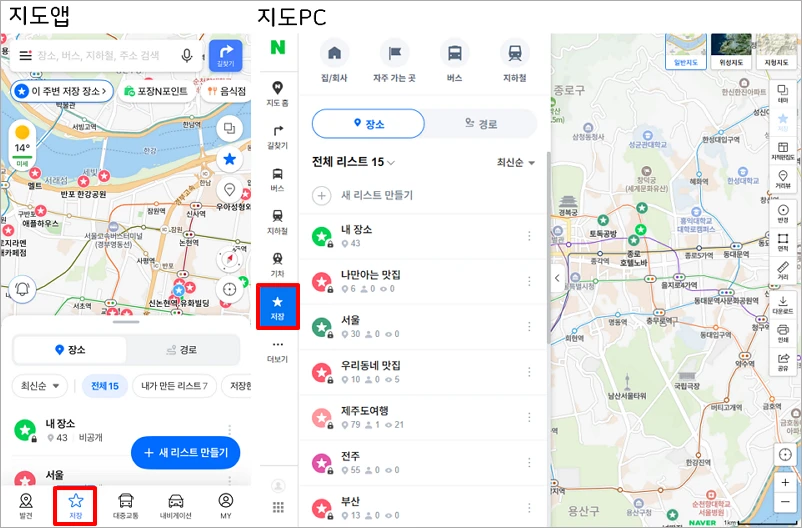
No. NAVER Map's own saved-place lists require a logged-in NAVER ID. You can still search places, open public links, and plan routes without building a native Save list, but anything you need to keep should live in a separate note, map list, or itinerary until you can use an account.
The reliable account-free method is simple: save the exact Korean place name, branch, road address or district, NAVER Map link, and one decision note together. Open NAVER Map only for the current listing and local route.
What login changes
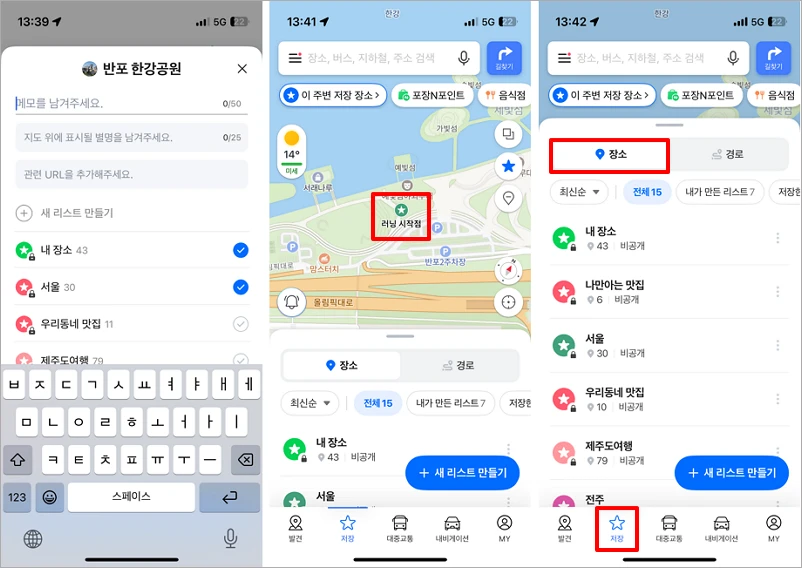
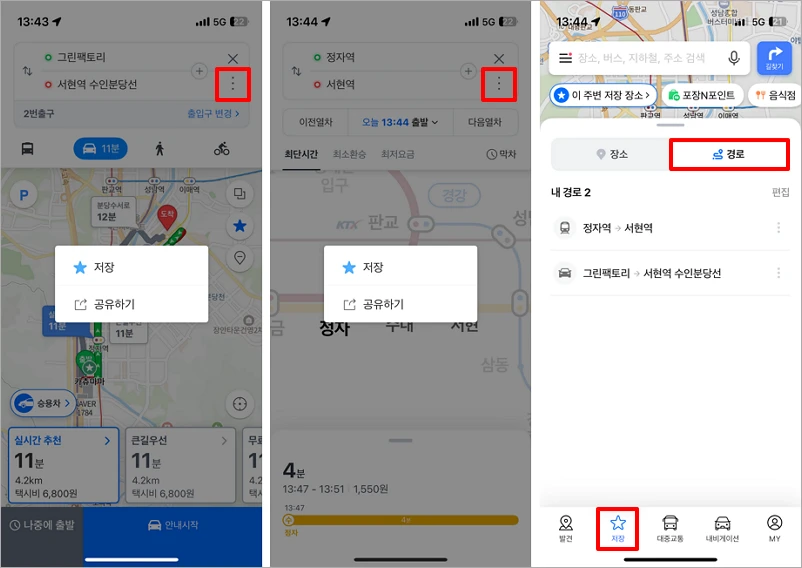
NAVER's official Map Save help, rechecked August 12, says saved information can be stored and used only while logged in with a NAVER ID. Signed-in users can create place lists, add a nickname, memo, and related URL, and find the entry again in the Save tab. Routes and frequently used transit items can also be saved.
Travelers in a discussion about a blocked NAVER account described continuing to use one-off searches while keeping places in Notes or Wanderlog. Those are personal workarounds, not NAVER policy. They are useful only because the official Save feature itself remains tied to login.
Search history is not the same as a saved list. A recently searched place may remain visible on one device for a time, but it is not a durable, organized itinerary and can be cleared. Do not rely on recents for a hotel, meeting point, clinic, or time-sensitive reservation.
Passport verification does not create an account-free Save list
NAVER introduced passport verification on June 4, 2026. Its June 9 official announcement, rechecked August 12, says foreign users with passports issued outside Korea can access supported NAVER Map booking, order, and payment services without a Korean phone number.
That is an important improvement, but it solves a different problem. You still need a NAVER account, and the feature applies to supported booking, order, and payment flows—not to creating a Save list while logged out. NAVER says support will expand in phases, so do not assume every business or external service accepts it.
The current passport-verification help requires the original, unexpired passport issued outside Korea, direct camera capture, face matching, and a name and birth date that match the NAVER account. The passport must not already be verified to another ID. Check the current screen before uploading identity information; do not send a passport image to a restaurant, host, or unofficial helper.
Build an account-free master list
A useful entry needs more than an English attraction name. Keep five items together:
- Korean place and branch name: exact text from the listing
- Area check: district or Korean road address, to avoid the wrong branch
- NAVER Map link: public place or share URL
- Decision note: “Tuesday lunch,” “near Exit 3,” “reservation 19:00,” or why the stop matters
- Offline fallback: entrance photo or screenshot only for a must-reach place
Put each day's candidates in one phone note or locally saved document. Selectable text is more useful than a screenshot folder because it can be pasted back into search. Keep private accommodation details, entry codes, and personal phone numbers out of a public or shared map.
If English search misses a listing, follow the guide to search NAVER Map with the exact Korean place name. For a destination another person may need to read, the Korean destination-card format adds the address, public phone number, and entrance detail. These paths are written without a locale prefix because Delivery Spot adds the reader's current language automatically.
Choose where the master list should live
A plain note: least friction
A local notes app can work without another service account. It is fast to search, easy to keep offline, and simple to copy into NAVER Map. It will not show every candidate as a pin. Organize by day or neighborhood rather than one very long “Korea” page.
Google Maps: useful for collaboration
If you already use a Google account, a Google Maps list can hold broad trip ideas. Google's official list guide explains how to create a list, show or hide it on the map, share a viewing link, and invite editors. Before local navigation, verify the exact Korean branch in NAVER Map; two map services can carry different names, pins, or closure status.
An itinerary planner: useful for days and groups
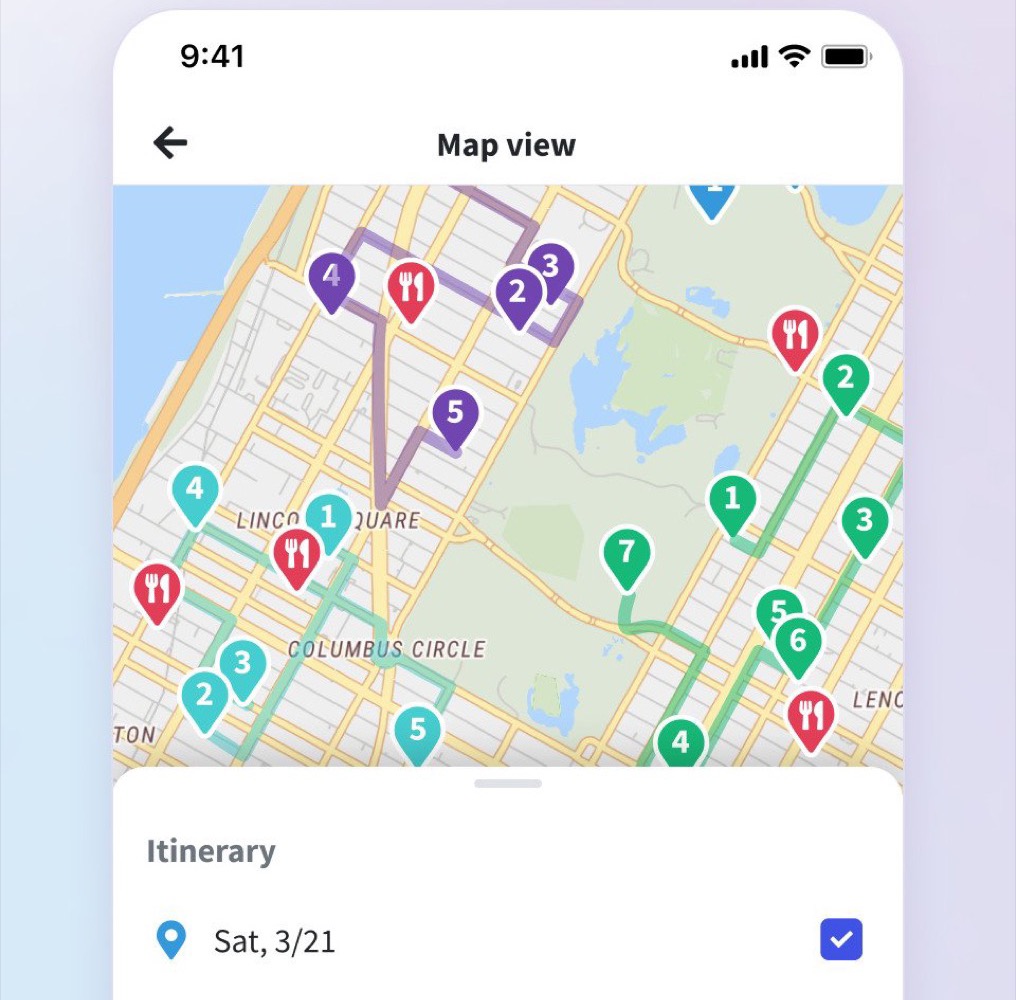
Wanderlog's official site combines an itinerary and map, which is convenient when daily sequence matters more than bookmarks. It is a separate service with its own account and privacy choices, not an account-free feature of NAVER. In another traveler planning discussion, some people described keeping the master plan in Wanderlog and opening individual places in NAVER for directions. Treat that as a community workflow and verify every Korean pin yourself.
A recent Korean NAVER Blog walkthrough shows separate signed-in lists for food, cafés, and routes. It is an individual walkthrough and its buttons can change, but the organizing idea is sound: reproduce a few useful folders in whichever tool you use.
Make the list resilient before departure
Open every must-reach NAVER link once, check the branch and current listing, then copy the final Korean text and URL into an offline note. Give a travel partner a read-only copy when appropriate. For the hotel, meeting point, clinic, or venue, save one entrance cue and a phone number from the public listing.
If account access becomes available later, rebuild only the short list you are likely to visit. The external master remains useful for day planning; NAVER Map handles the final Korean listing and local route.
The answer therefore remains no for native Save lists, but that does not block the trip. A clean external list with exact Korean text is often more portable, easier to share, and safer to keep offline than depending on one account.
Sources and image credits
- NAVER Map Help: Save — Official login requirement and Save-list functions; rechecked August 12, 2026.
- Delivery Spot place-save image — Published screenshot asset derived from the credited NAVER Map Help page.
- Delivery Spot route-save image — Published screenshot asset derived from the credited NAVER Map Help page.
- Traveler discussion about a blocked NAVER account — Used only for account-free workflow ideas, not as NAVER policy.
- NAVER Corp.: Passport Verification announcement — Official June 9 announcement of the June 4, 2026 launch and supported booking, ordering, and payment scope; rechecked August 12, 2026.
- NAVER Help: Foreign Passport Verification — Current eligibility, original-passport, face-match, and account-data conditions; rechecked August 12, 2026.
- Google Maps Help: Create a list — Official list, sharing, and collaboration instructions.
- Traveler planning discussion — Used only as a community signal for the Wanderlog-to-NAVER workflow.
- Delivery Spot Wanderlog image — Published product screenshot credited to Wanderlog.
- NAVER Blog list walkthrough — Individual Korean walkthrough used only for folder-organization context.
- Wanderlog — Official product page and source credit for the itinerary-map image.
- Delivery Spot cover image — Published cover asset showing NAVER Map Save tabs on mobile and desktop.
Last updated


