
CatchTable Waitlist vs Naver Booking vs a Door List
CatchTable waitlists, Naver bookings, and restaurant door lists solve different problems. Learn what counts as confirmed, how on-site priority works, and what to verify before you leave for a popular restaurant in Korea.
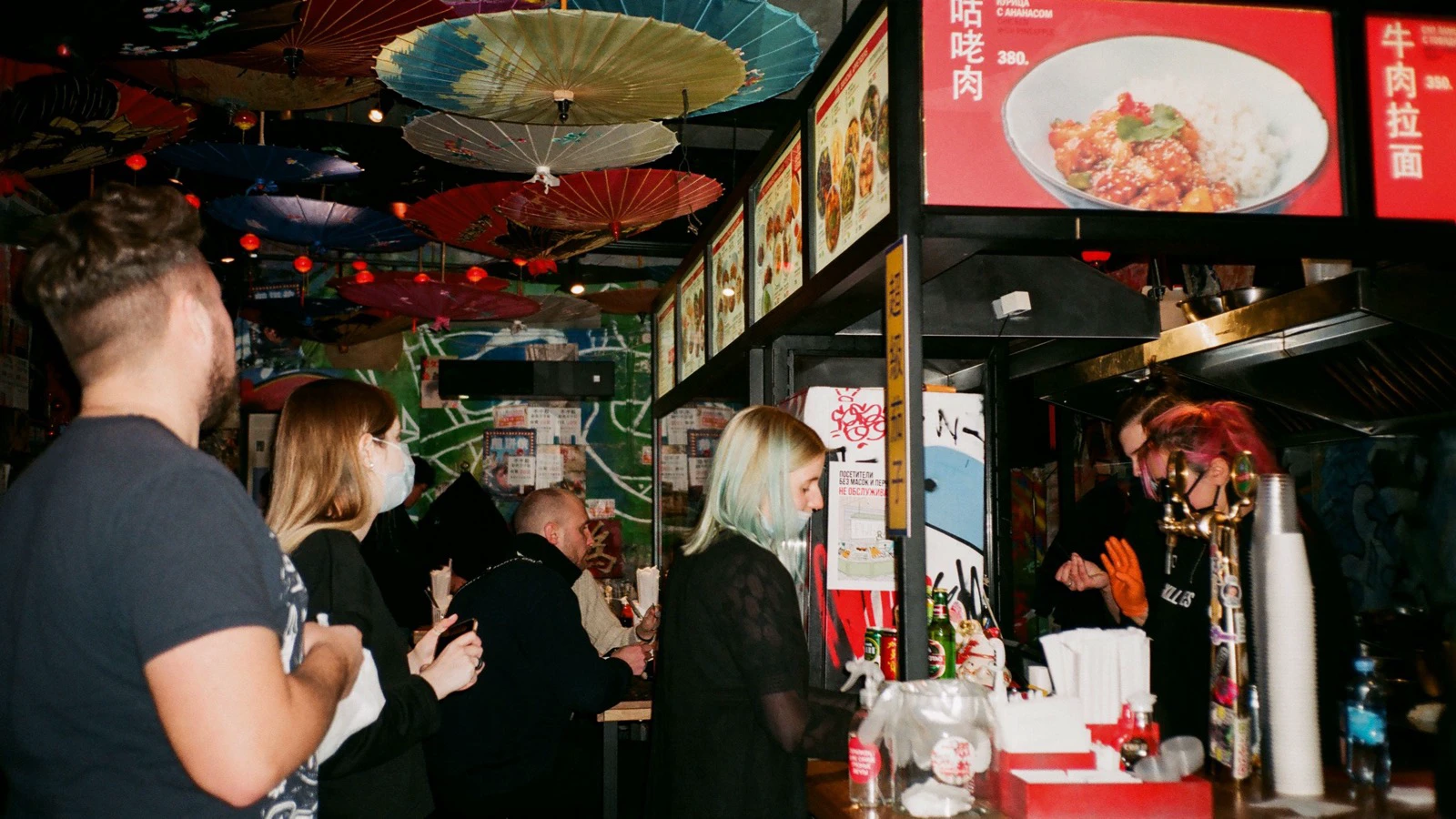
A CatchTable waitlist puts you in a same-day queue, Naver Booking requests or confirms a time slot, and a door list follows only that restaurant’s on-site rules. They are not interchangeable: look for a confirmed reservation, keep the stated notification channel working, and return within the restaurant’s own call window.
One important distinction comes first: CatchTable is also a reservation platform. The brand name alone does not tell you whether you booked a future time or joined today’s line. Read the action on the exact restaurant page—reservation, remote waiting, or on-site waiting—and check the branch before you rely on it.
If you need a future table, start with the exact branch
For an overseas visitor seeking a future reservation, CATCHTABLE Global is usually the simplest first check when it lists the exact branch. The current VISITKOREA CATCHTABLE Global guide describes Google, Apple, or email sign-in without a Korean phone number, foreign-card deposits, and support for 20 languages. A Reserve action is a future booking; Join Remote Waitlist is a same-day queue. Search both the English and Korean branch names when needed, and never transfer availability from one branch to another.
NAVER also supports more overseas users than old phone-number-only advice suggests. Its foreign-visitor Booking/Order help says participating businesses can accept non-resident foreign visitors, offer automatic translation in English, Japanese, and Simplified Chinese, and support overseas-card prepayment for eligible products. The flow may ask for a valid non-Korean passport and face verification. Restaurant participation and product availability still vary, so set up the account before a release time and confirm the exact branch, date, time, and party size on the final screen.
The three systems at a glance
- CatchTable waitlist: a place in today’s queue, proved by a live status page or waitlist number. The estimate can change, and you can lose the place by missing the alert or return deadline.
- Naver Booking: a requested or confirmed dated time slot. Only the confirmed booking screen proves it; a pending request does not.
- Door list, ticket, or staff queue: that restaurant’s walk-in process for that service. Your proof may be a written name, number, QR entry, or staff acknowledgement, while priority and closing rules remain restaurant-specific.
This summary describes the role of each system, not a universal guarantee. A restaurant can combine them, pause one of them, cap the line, or change its process between lunch and dinner.
On Naver, “request” is not “confirmed”
Naver’s official English booking help tells users to open the restaurant listing and use its Reserve, Book, or Order button when available. The crucial status distinction is explicit: “Booking in progress” or a booking request is not yet a confirmed reservation. Wait until the booking is shown as confirmed.
Before you close the page, verify the restaurant name and branch, date, time, party size, booked product or menu, and payment method. Save the booking detail screen or reference number. If you cannot select a time, that slot is not available through that booking page; sending a message or showing up does not convert it into a reservation.
Payment also does not answer the confirmation question by itself. Naver says businesses may use Npay, payment at the restaurant, or another method. CatchTable's merchant terms make clear that a venue can set its own deposit and cancellation conditions. Read the terms attached to the exact booking instead of assuming that a paid booking is stronger—or that a free one is fake.
A CatchTable waitlist is a live queue
CatchTable’s official multilingual waitlist guide shows an on-site flow: scan the QR code on the restaurant tablet, enter the requested information, check the live waitlist status, and receive an email when the table is nearly ready. Treat that as a guide to the illustrated CatchTable flow, not a promise that every restaurant uses the same entry method or notification channel today.
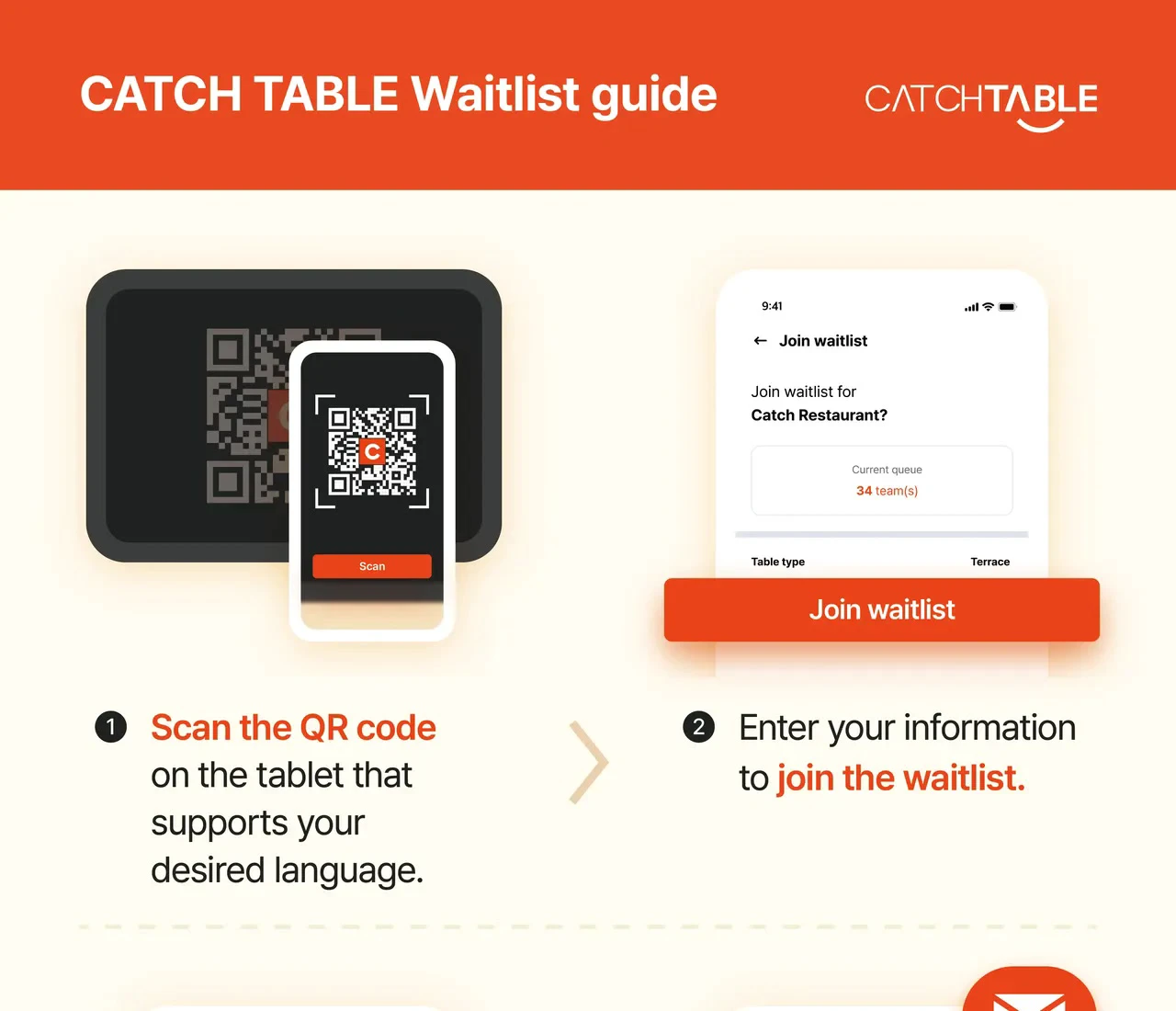
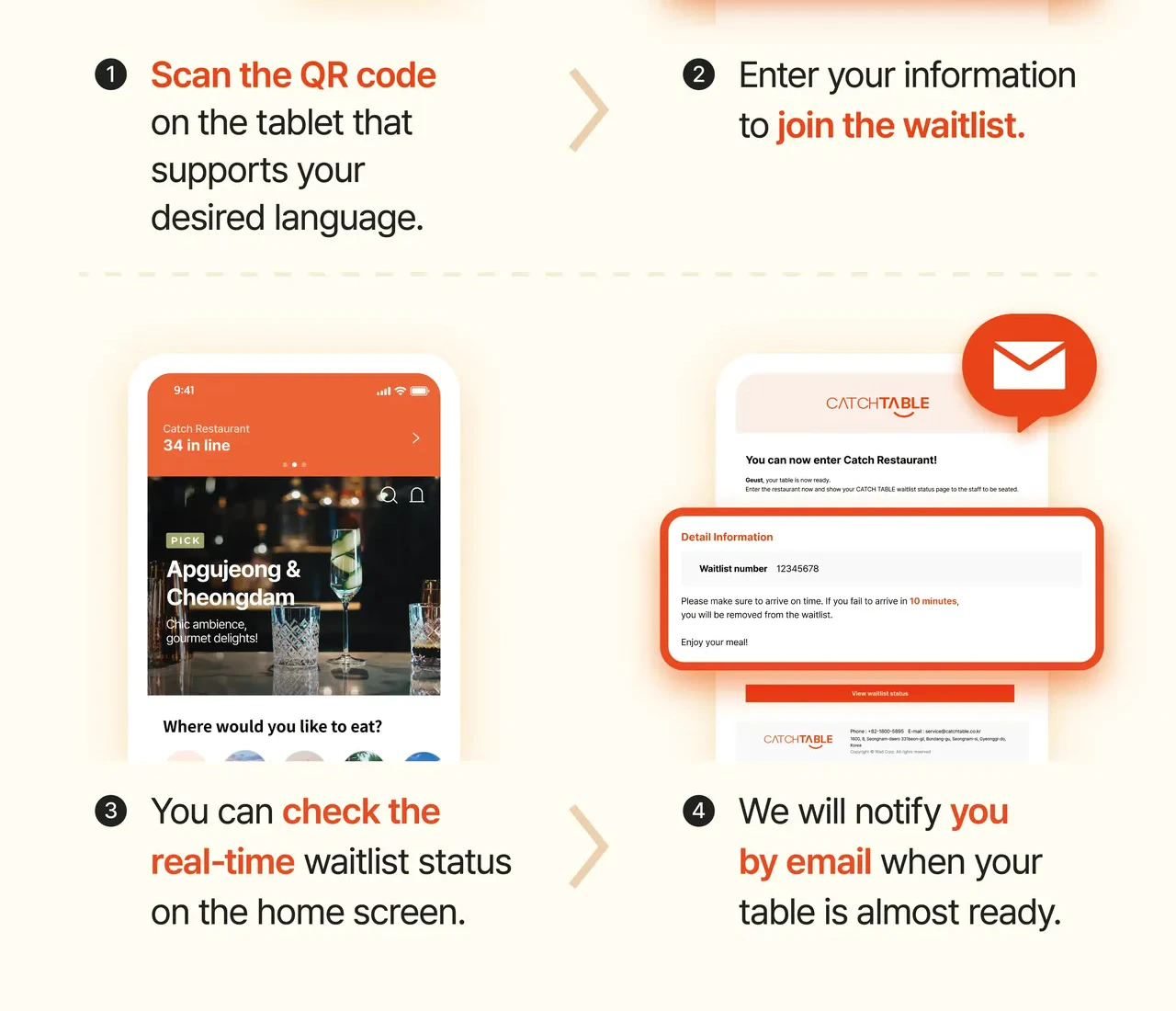
The first slide shows joining by QR code; the second shows queue status and an email notice. The official poster also illustrates removal after failing to arrive within ten minutes, but the deadline that matters is the one displayed for your live waitlist and restaurant. A restaurant may use a different window, so read the screen and ask if it is unclear. Product screens can also change after this February 2024 guide was published.
A queue estimate is not an appointment. Tables turn at different speeds, party sizes affect seating, and the number of teams ahead can move unevenly. Keep the status page open, make sure email or the stated alert channel works, and stay close enough to return. If the page offers both reservation and waiting, do not confuse a waitlist number with a future reservation confirmation.
A door list has no universal priority rule
A walk-in line may be a clipboard, numbered ticket, kiosk, QR code, or a name recorded by staff. Ask how you will be called, whether you can leave, how many teams are ahead, and how quickly you must return. If staff only acknowledge that they heard your name but do not record it, politely confirm that you are actually on the list.
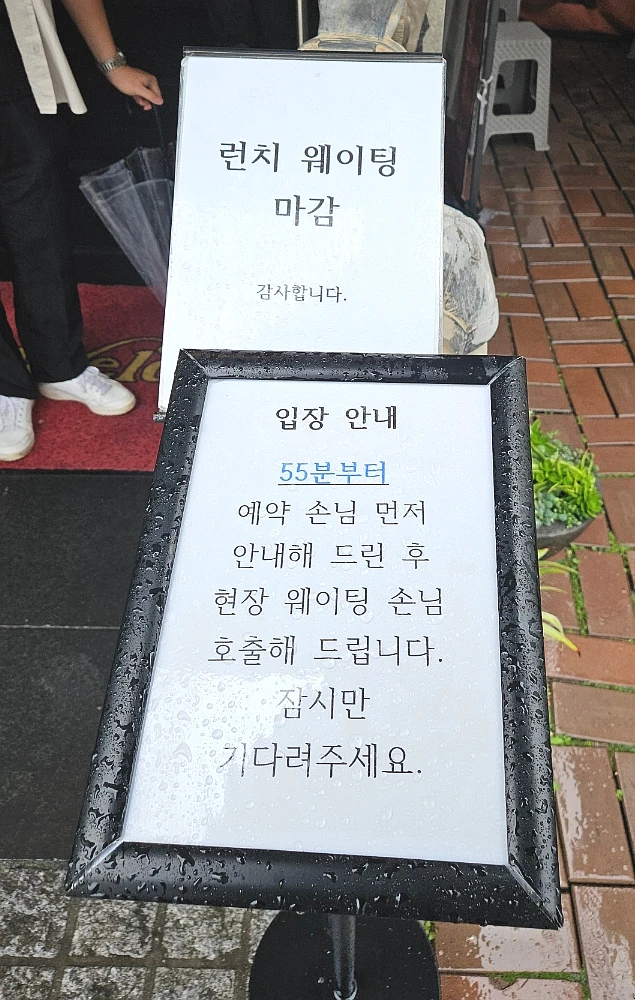
This October 2025 restaurant-specific example says lunch waiting has closed and that reservation guests will be guided first from 55 minutes past the hour, followed by walk-ins. It is useful because it shows why visible people at the door are not necessarily one first-come, first-served line. It does not establish a rule for other restaurants—or even for this restaurant on another service.
When a restaurant has both reservations and walk-ins, staff may reserve tables for upcoming bookings while seating a party of a different size from the queue. Do not infer that you were skipped just from who entered first. Ask for the current process, then decide whether the uncertainty fits your schedule. Our guide to restaurant break time and last order explains another common reason a queue can close before the posted closing time.
Use this five-step check before you travel across town
- Identify the action. Does the Korean label say
예약(reservation) or웨이팅(waiting)? Is it for the exact branch you intend to visit? - Verify the state. A request, pending review, or queue entry is not the same as a confirmed time slot. Open the detail page rather than relying on a push-notification preview.
- Read the live terms. Check date, time, party size, menu or seating condition, deposit, cancellation cutoff, no-show rule, and return deadline.
- Keep evidence and alerts available. Save the confirmation or queue number, keep your battery and data connection usable, and monitor the channel named on the screen.
- Ask at the door. Show the reservation name or waitlist screen and confirm whether you should remain nearby, return at a time, or wait for a call.
These short questions cover most of the uncertainty:
예약 확정됐나요?— Is my booking confirmed?현장 웨이팅은 어디서 등록해요?— Where do I join the on-site waitlist?몇 팀 남았어요?— How many parties are ahead of me?호출받으면 몇 분 안에 와야 해요?— How many minutes do I have to return after I’m called?예약 손님과 현장 대기 순서가 어떻게 돼요?— How are reservations and walk-ins ordered?제 이름은 ___로 예약했어요.— The reservation is under ___.
Travelers repeatedly ask whether CatchTable inventory is as reliable as Naver and whether a Naver booking without a deposit is truly confirmed. Recent Reddit discussions comparing the platforms and CatchTable Global experiences contain both successful reports and conflicting assumptions. Those anecdotes identify the anxiety; they do not override the status and terms on your own booking.
Keep one model in mind: a confirmed time, a place in a live queue, and a name on a door list are three different promises. Verify which one you actually have, then follow the restaurant’s live instructions rather than the platform logo. If you are unsure how the interaction proceeds after you enter, see our Korean restaurant etiquette guide.
Sources and image credits
- VISITKOREA CATCHTABLE Global guide — Current overseas-user sign-in, foreign-card deposit, language support, reservation, and waitlist features.
- NAVER foreign-visitor Booking/Order help — June 2025 expansion, participating-business limits, automatic translation, and eligible overseas-card prepayment.
- NAVER foreign-passport verification help — Possible non-Korean passport and face-verification step.
- NAVER official English booking help — Book-button flow and the distinction between a request or Booking in progress and a confirmed reservation.
- CATCHTABLE merchant terms — Venue-set deposit and cancellation conditions.
- CATCHTABLE official multilingual waitlist guide — February 2024 QR, live-status, and email-alert example; also the source of the two guide slides, cropped for legibility and used with written operator permission.
- Reddit discussion comparing CATCHTABLE and NAVER — Mixed traveler reports used as an anxiety signal, not as confirmation evidence.
- Reddit CATCHTABLE Global experiences — Individual successful and conflicting reports that do not override the live booking state.
- Darya Sannikova on Pexels — Original queue photo used for the 16:9 cover crop.
- Pexels license — Reuse terms for the cover image.
- 마이쭈 on Naver Blog — Original page for the October 2025 restaurant waiting signs, used with written operator permission.
- Delivery Spot featured image file — Cropped restaurant-queue image used as the cover.
Last updated


