
Travel Korea Without Speaking Korean: What to Prepare
Yes, you can travel in Korea without Korean. Test translation and mobile data, save exact Korean place details, know when to leave a failed digital flow, and keep 112/119 separate from uncertain 1330 availability.

Yes, you can travel in Korea without speaking Korean. The trip becomes much easier when you prepare for the moments where visual cues disappear: kiosk screens, text-heavy menus, Korean-only place details, phone calls, and a digital flow that rejects an overseas number or card.
You do not need months of language study. You do need working mobile data, a camera-capable translator, exact Korean text for important places, and a staffed backup when a machine or booking system will not accept you.
Prepare six things before the flight
- Install Papago or another translator with camera and conversation functions; test the exact features and offline data you intend to use.
- Save the accommodation's Korean name, full road address, phone number, map pin, entrance photo, and check-in instructions.
- Screenshot reservations and the Korean branch names of stations, restaurants, clinics, venues, and attractions.
- Keep mobile data working from arrival. A translation app is not a backup if it cannot load when needed.
- Save the four Korean request cards near the end of this guide in a note that opens without typing.
- Record 112 for police and 119 for fire or ambulance separately from tourist information.
Korea Tourism Organization's Helpful Apps & Resources page, last updated in June 2026 and rechecked August 12, recommends Papago for translation and NAVER Map for routes and place information. Use it as a starting list, then test the apps on your own phone before departure.
1. A kiosk has no useful language option
Many transport, café, fast-food, and restaurant machines have a language button, but not every screen, option, or product name is translated. Some table-order devices provide English; others do not. A recent restaurant-ordering discussion among Korea travelers includes both experiences. Treat it only as a signal that language support belongs to the exact machine, not as a nationwide rule.
First look for a globe, flag, or language label. If the translated flow becomes unclear, photograph the screen and translate it before selecting. Check the final basket for quantity, size, spice level, add-ons, and takeaway or dine-in before paying.
If the machine rejects your card or asks for a Korean phone number, stop repeating the same failed flow. Show the item to staff and ask to order at the counter, choose another payment method, or use a staffed alternative. The useful request is 키오스크 사용을 도와주실 수 있나요? (Could you help me use the kiosk?).
2. A menu has pictures but hides the decision-changing text
A photo can identify a dish while hiding portion size, required minimum orders, ingredients, or whether the price is per person. Translate the full menu heading and the text around the item, not only its name. Keep the original screen visible so staff can point to the exact choice.
NAVER's official Papago App Store listing, rechecked August 12, lists image, voice, conversation, and offline translation functions. Availability and supported languages can change by app version and device, which is why testing before the trip matters.
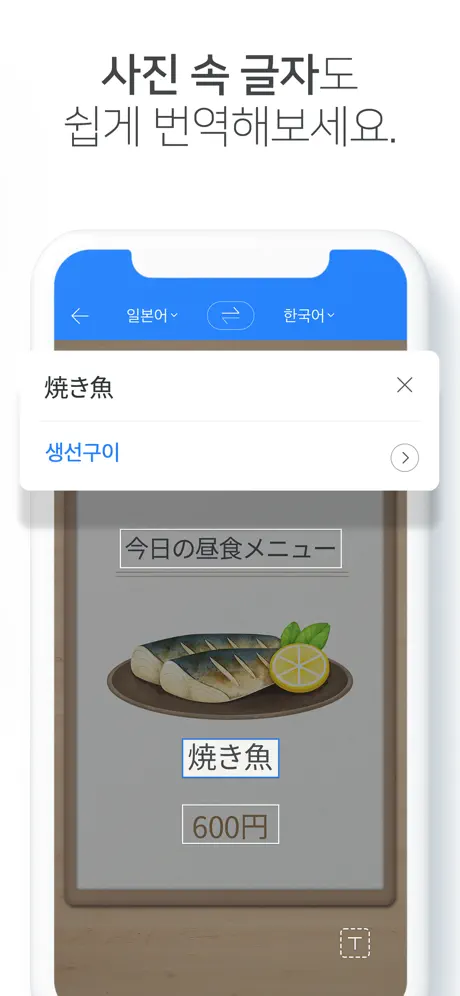
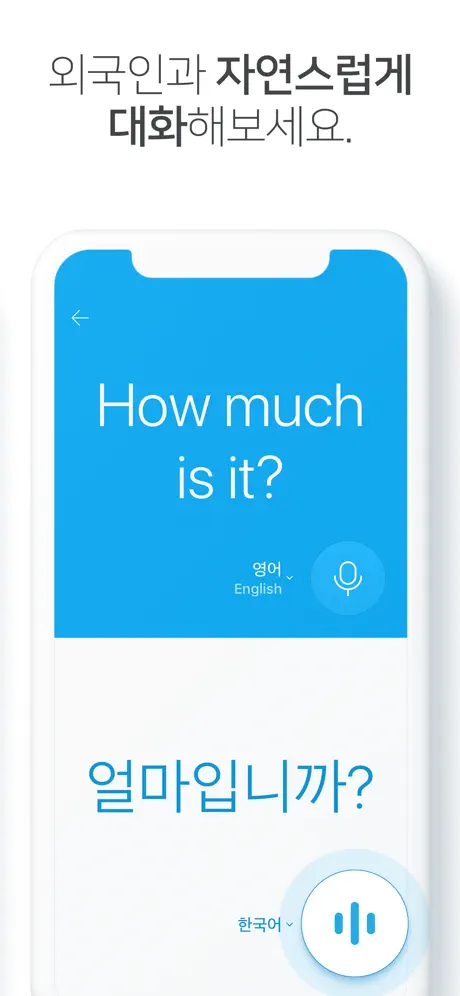
Machine translation is a convenience, not a safety guarantee. If you have a serious food allergy, prepare 저는 ___ 알레르기가 있습니다 (I am allergic to ___) with the exact ingredient written in Korean, show it before ordering, and choose another restaurant if staff cannot confidently confirm the ingredients and cross-contact risk.
3. You have an address, but not the place card Korea needs
An English place name may refer to several branches, and a Romanized address may not identify the entrance. Save a place card with the Korean business name, exact branch, road address, phone number, NAVER Map pin, and one entrance photo. For accommodation, keep the building and unit details only in a private note.
When using a taxi, show the Korean address and keep the pin open. 이 주소로 가 주세요 means Please take me to this address. If the destination is inside a market, mall, station, hospital complex, or alley, also save the nearest named entrance.
This habit is more useful than memorizing long directions. A driver, station employee, hotel desk, or passerby can see the same exact place without translating a vague English name.
4. A reservation or payment flow rejects you
Some services require a Korean phone number, identity verification, or local payment method; others have an international flow. Traveler reports in a broad discussion of inconveniences in Korea mention number and payment barriers, but they are individual experiences—not proof that every service has the same rule.
Use the lowest-friction alternative: choose the international version, message through the platform, visit in person, ask a hotel desk to confirm details, or choose another business. Do not borrow a stranger's verified account or put identity and payment information into an unofficial workaround.
For phone help, save 전화로 확인해 주실 수 있나요? (Could you check by phone for me?) for a hotel desk or information counter. Ask for help with a specific detail rather than handing over an unlocked phone or payment approval.
5. Keep tourist information and emergencies separate
KTO's 1330 Travel Helpline page lists tourist information, interpretation, call, and chat channels. However, an official January 20, 2026 maintenance announcement says the 1330 call and chat service was temporarily unavailable “until further notice.” Later KTO pages, including the June 2026 apps page, still list 1330. Because those official pages conflict and no clear resolution was visible when rechecked on August 12, do not make 1330 your only plan: open the current page and test the live channel before relying on it.
For danger to life or property, use emergency services. KTO's international-visitor safety guidance says to call 112 for police or 119 for fire department and ambulance. If you do not speak Korean, say “English please” or “Interpreter please” when connected. Know your current location; a nearby building name and your phone's GPS can help.
1330 is travel information or interpretation support, not a substitute for 112 or 119 during an emergency.
Keep these four Korean cards on your phone
- 영어 메뉴가 있나요? — Do you have an English menu?
- 키오스크 사용을 도와주실 수 있나요? — Could you help me use the kiosk?
- 이 주소로 가 주세요. — Please take me to this address.
- 전화로 확인해 주실 수 있나요? — Could you check by phone for me?
The realistic preparation level is small: show exact Korean text, translate a screen or menu, and switch to a staffed option when a digital flow fails. With those backups, not speaking Korean is an inconvenience you can plan around—not a reason to postpone the trip.
Sources and image credits
- Delivery Spot cover image — Published cover showing a traveler using a phone beside luggage.
- Korea Tourism Organization: Helpful Apps & Resources — Official June 2026 list covering Papago, NAVER Map, Emergency Ready, and 1330; rechecked August 12, 2026.
- Traveler restaurant-ordering discussion — Used only to show that machine language support varies, not as official policy.
- Papago App Store listing — NAVER's official current feature listing and original source for both app preview images; rechecked August 12, 2026.
- Traveler inconvenience discussion — Used only as a question signal for number and payment barriers.
- KTO: 1330 Travel Helpline — Official call and chat information page; rechecked August 12, 2026.
- KTO: 1330 maintenance announcement — January 20, 2026 notice saying call and chat were unavailable until further notice; no clear resolution was visible at recheck.
- KTO: Disaster safety for international visitors — Official 112/119 and interpretation instructions; rechecked August 12, 2026.
- Delivery Spot Papago image preview — Published web asset derived from the credited NAVER App Store source.
- Delivery Spot Papago conversation preview — Published web asset derived from the credited NAVER App Store source.
- Delivery Spot multilingual help graphic — Published web asset credited to Korea Tourism Organization through VISITKOREA.
Last updated


