
What Stops Working in Korea Without a Korean Phone Number?
Korea travel works without a local number until a service asks for contact, SMS, or resident identity. Learn which tourist routes solve each block.

You can travel around Korea without a Korean phone number. Maps, translation, public transport, ordinary card payment, and walk-in sightseeing do not stop working because your SIM is foreign. The friction usually appears at the last action: joining a restaurant queue, receiving a one-time code, taking a delivery callback, opening a mobile ticket, or passing Korean resident identity verification.
Before buying another SIM, read the exact request on the screen. A contact-number field, an SMS code, and identity verification against Korean subscriber records are three different problems. A local number may solve the first, sometimes solve the second, and still fail the third.
Identify the block before trying to fix it
- Contact number: a business needs somewhere to call or text. A tourist 010 number often helps, but a foreign number, email, or in-app chat may also work.
- SMS verification code: the service sends a one-time message to a number it accepts. A tourist 010 number helps only when both the service and the tourist plan support it.
- Korean identity verification: the number, subscriber name, and Korean identity record are checked together. A tourist 010 number usually does not solve this; a travel SIM does not make the holder a verified resident.
LG U+ states the limit directly in its tourist eSIM guidance: voice-and-SMS products can receive verification messages for some restaurant and taxi apps, while banking and government identity verification is not supported. Its data-only service does not support SMS verification. Even a phone that displays a Korean 010 number after arrival may therefore fail when the service expects resident-name matching.
If you are still choosing connectivity, compare a data-only eSIM with a Korean-number plan. Pay extra only when a service central to your trip confirms that ordinary call or SMS reception is enough.
Restaurant booking has two better tourist routes
NAVER introduced overseas-passport verification on June 4, 2026. Its official announcement says a foreign passport can unlock supported NAVER Map bookings, orders, and payments without a Korean mobile number. The rollout was announced on June 9; it was not a promise that every venue and every NAVER feature would work immediately.
The word supported matters. NAVER Booking help explains that an individual business can decide whether to accept a booking or order from an overseas user. Complete passport verification before a high-demand booking, then open the exact venue page and confirm that the button and overseas-user path appear. A successful passport check does not create a reservation slot or override a venue’s setting.
Catchtable Global is the other useful route. Korea Tourism Organization guidance says users can sign in with Google or Apple, use a foreign-issued card, and access reservation and remote-waitlist features at participating restaurants without a Korean number. Coverage is still the deciding factor: a restaurant or a particular queue may not be listed.
For choosing between the two, use the separate NAVER and Catchtable restaurant-reservation guide. Do not borrow someone else’s number first; check the global or passport route first.
Two number-free routes shown by the official services
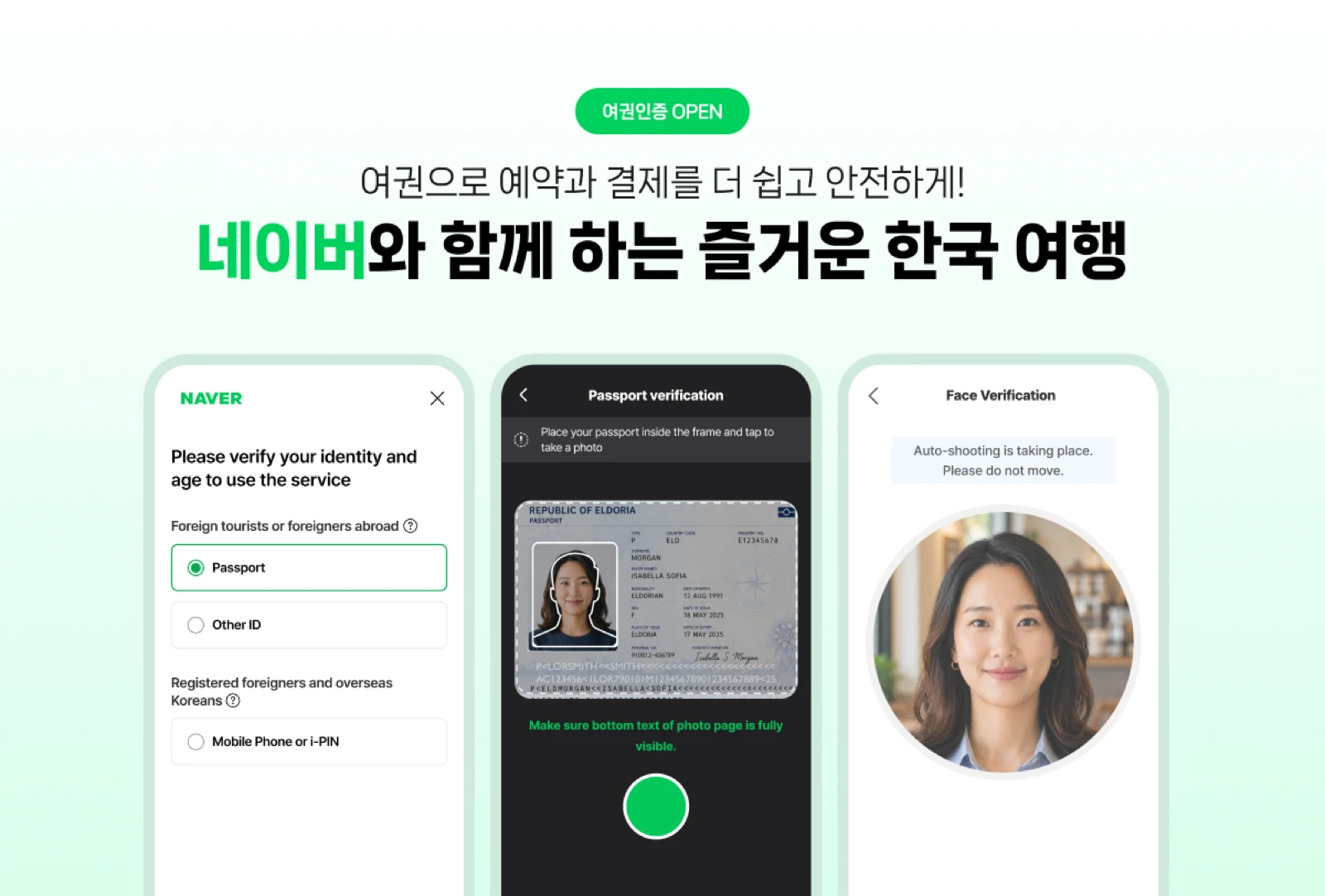
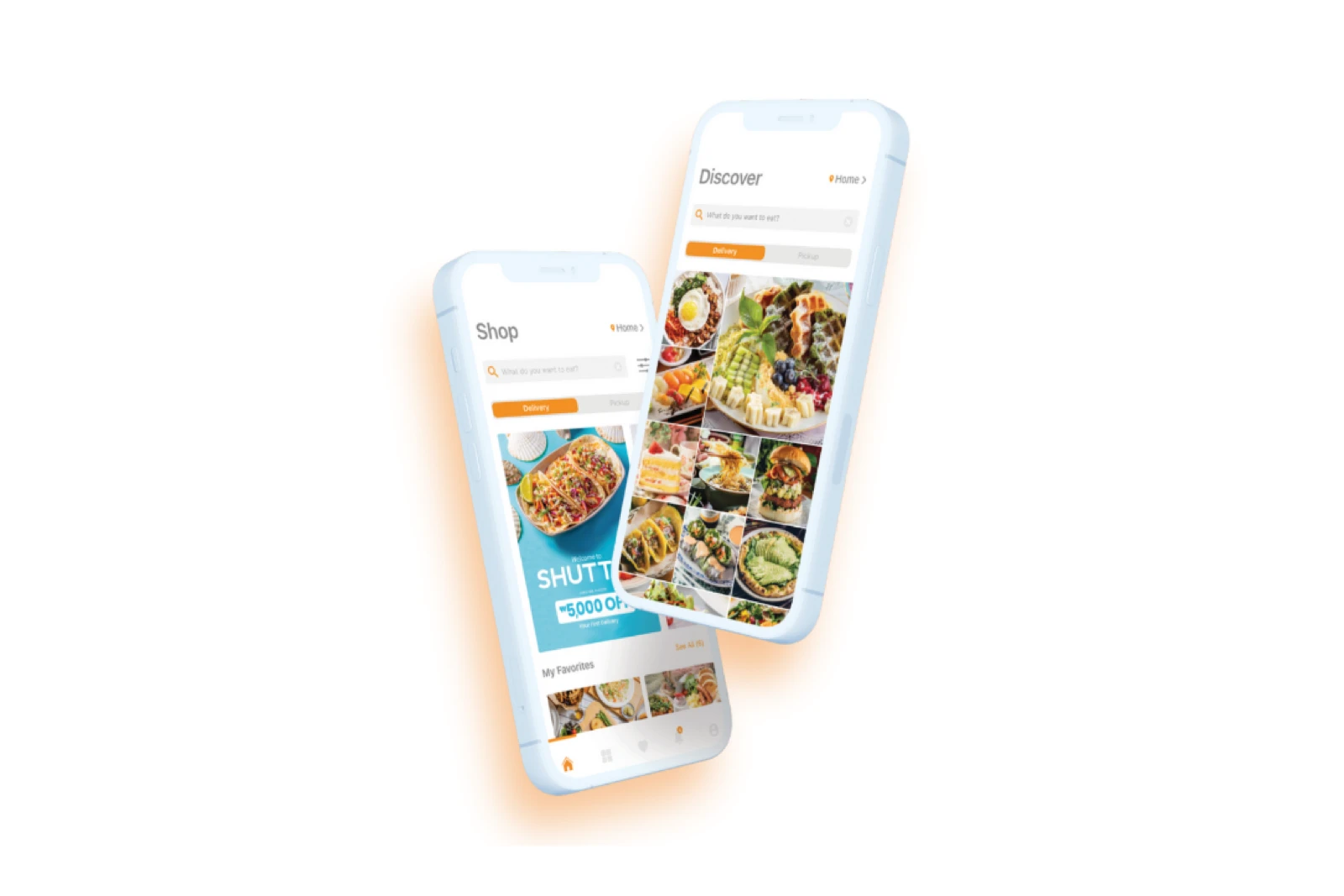
The NAVER image shows passport and face verification. The Shuttle image shows a delivery service built around app status and support rather than a local-number-only checkout. They solve different tasks, but both demonstrate the right planning rule: use the purpose-built overseas-user route before trying to imitate a resident account.
Ticketing rules belong to the exact event
Ticketing is not one phone-number rule. The same ticket brand can have a domestic sales page, a global page, a fan-club presale form, a mobile-ticket app, and an on-site will-call desk with different requirements.
Use the event’s official global page when one exists. Copy the buyer and attendee name exactly as shown on the passport that will be carried to the venue. NOL World publishes event-specific conditions for ID, mobile tickets, transfers, and pickup; read the notice for the exact event rather than borrowing instructions from another concert.
A hotel phone number may satisfy a contact field only when the seller allows it. It cannot replace the buyer’s identity on a name-bound ticket, receive a code you must present in your own app, or repair a mismatch between the order and passport. Take a screenshot or offline copy of the order number, pickup location, accepted ID, and ticket-release time before event day.
Delivery may work without a number; the handoff still needs precision
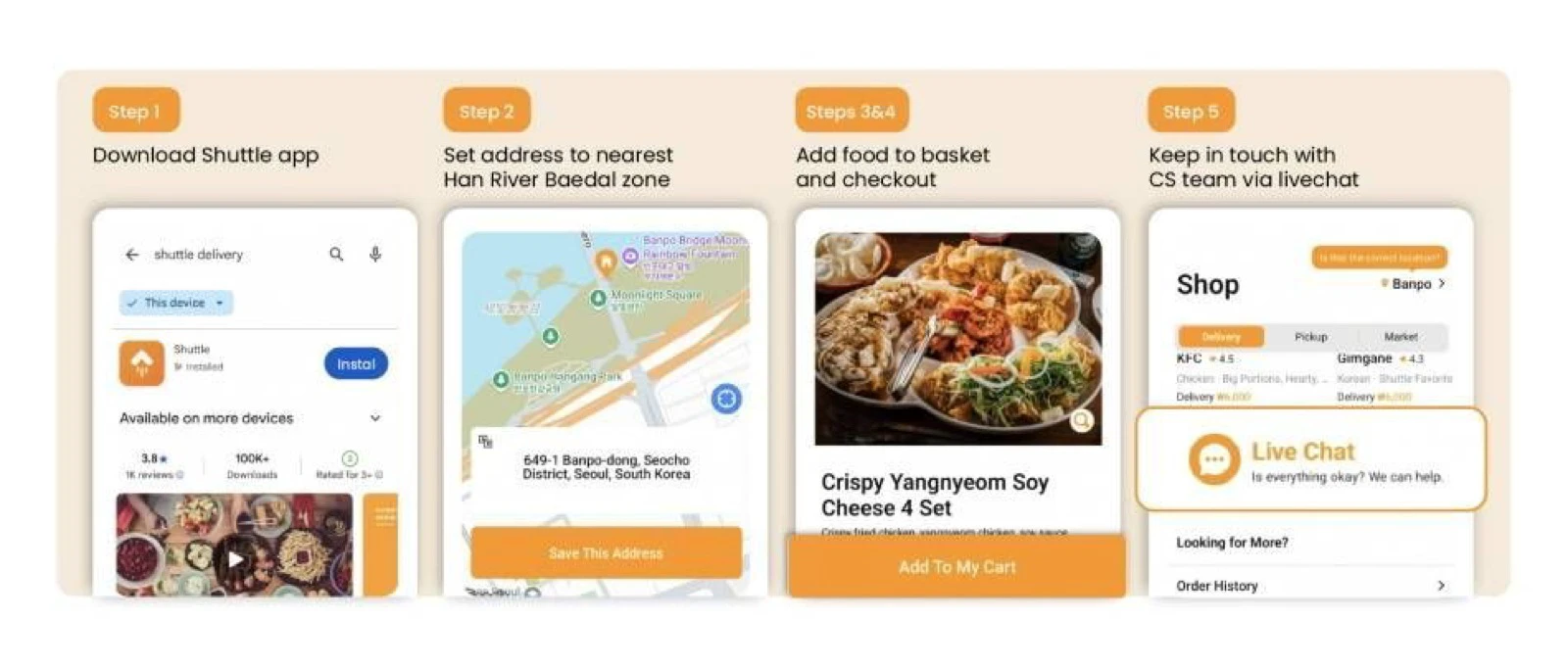
Shuttle’s basic tourist route does not require a Korean phone number. The Korea Tourism Organization’s Shuttle guide lists sign-up without a local number, international-card payment, English-language support, and core service zones. Its geographic examples are not a guarantee that every address or restaurant is available today; the app’s address screen is the live test.
Shuttle’s own tourist ordering guide describes email or social sign-in, foreign cards or PayPal, push order updates, and support through in-app chat. A separate account guide says phone verification is required for Shuttle credit and some coupons, not the ordinary order path. Treat promotions and ordering as separate features.
The remaining risk is physical delivery. Use the accommodation’s exact Korean address, confirm whether riders may enter the building, add the building, lobby, room, or pickup instruction the property allows, keep notifications on, and stay reachable in the app. A platform can accept payment and still fail at an incomplete address.
A fallback plan for the common blocks
Restaurant queue: Look for NAVER passport verification or Catchtable Global. If neither lists the venue, ask whether walk-in registration, an email booking, or an on-site queue is accepted.
Ticket sale: Move to the official global sales page. Check passport name, purchaser/attendee rules, mobile-ticket delivery, and pickup ID before payment.
Food delivery: Try Shuttle or another explicitly tourist-facing route, then verify the live address coverage and handoff instructions. If the building is difficult, choose pickup or dine in.
Callback-only service: Ask whether email or in-app chat is accepted. If the callback is essential and the business confirms it accepts an ordinary tourist line, a voice-and-SMS plan may be worth buying.
Resident identity screen: Stop retrying with borrowed numbers. Look for a passport, overseas-user, or in-person path. A 010 number without matching resident identity is not the missing credential.
What to do when a screen blocks you
- Back out and look for Global, Overseas user, Passport verification, or an international sign-in.
- Decide whether the service wants contact, an SMS code, or Korean resident identity verification.
- Check the exact venue, event, address, or feature—not only the platform’s general homepage.
- Ask whether email, in-app chat, foreign-card checkout, or on-site registration is accepted.
- Buy a numbered tourist SIM only after the exact service confirms that a standard call or SMS is enough.
- Let hotel staff help explain an address or call a venue, but never ask another person to lend an identity for a ticket or verification step.
A Korean number is most useful when the itinerary truly depends on callbacks or ordinary SMS. It is not a universal key, and a data-only plan may already cover the parts of the trip that matter most. Decide from the one or two services you will actually use, then prepare a number-free fallback before the booking window or delivery day.
Service routes and official guidance were rechecked on August 12, 2026. App coverage, venue participation, event conditions, and accepted verification methods can change; confirm the exact screen before paying.
Sources and image credits
- LG U+ tourist eSIM — Difference between data-only and voice/SMS plans, app SMS verification, and unsupported banking or government identity verification; rechecked August 12, 2026.
- NAVER — Passport Verification announcement — June 2026 overseas-passport route for supported NAVER Map booking, order, and payment features.
- NAVER Booking help — Overseas-user booking qualifier and business-level participation.
- VISITKOREA — Catchtable Global — Google or Apple sign-in, foreign-card payment, and number-free reservation and waitlist route at participating restaurants.
- NOL World — Current global ticket marketplace used to verify that conditions are shown per event.
- VISITKOREA — Shuttle Delivery — Number-free sign-up, payment, language support, service-zone context, featured cover photograph, and Shuttle step-guide image.
- Shuttle — Tourist ordering guide — Account, address, foreign payment, push notification, and in-app support flow; rechecked August 12, 2026.
- Delivery Spot featured Shuttle rider image — Published web asset credited to Shuttle Delivery via the Korea Tourism Organization.
- Delivery Spot Shuttle step-guide image — Published web asset credited to Shuttle Delivery via the Korea Tourism Organization.
- Delivery Spot NAVER verification image — Published web asset credited to NAVER Corporation.
- Delivery Spot Shuttle app image — Published web asset credited to Shuttle Delivery.
Last updated


