
How Much Mobile Data Do You Need Per Day in Korea?
Most Korea travelers need about 1–3 GB per day: 1 GB for maps and messages, 2–3 GB for social media and uploads, and 5 GB+ for streaming or tethering. These are planning allowances, not guarantees.

For most Korea trips, plan on 1–3 GB per day: about 1 GB if you mainly use maps and messages, 2–3 GB if you also scroll social media and upload photos, and 5 GB or more if you stream video, make long video calls, or tether a laptop. These are planning allowances rather than guarantees; the activity that changes the answer fastest is video, not navigation.
Choose for your busiest ordinary day
Do not start with the length of the trip. First choose the daily band that matches a normal busy day, then multiply it by the number of days if the plan has one shared data pool.
Around 1 GB per day suits a light-use traveler who keeps mobile data for Naver Map or another navigation app, transit searches, messaging, tickets, translation, and short web checks. It assumes no regular video streaming, large cloud backup, or laptop hotspot use. For seven days, a 7–10 GB total plan gives this traveler a little room for a heavier day.
Around 2–3 GB per day is the safer default for a traveler who uses maps throughout the day, scrolls image- and video-heavy feeds, uploads photos, posts short clips, and occasionally makes a video call. For ten days, that points to roughly 20–30 GB total.
At least 5 GB per day, or a genuinely suitable unlimited plan, is for frequent HD streaming, repeated video calls, large photo or video uploads, or laptop tethering. A single high-quality video session can use more data than a full day of maps and messages.
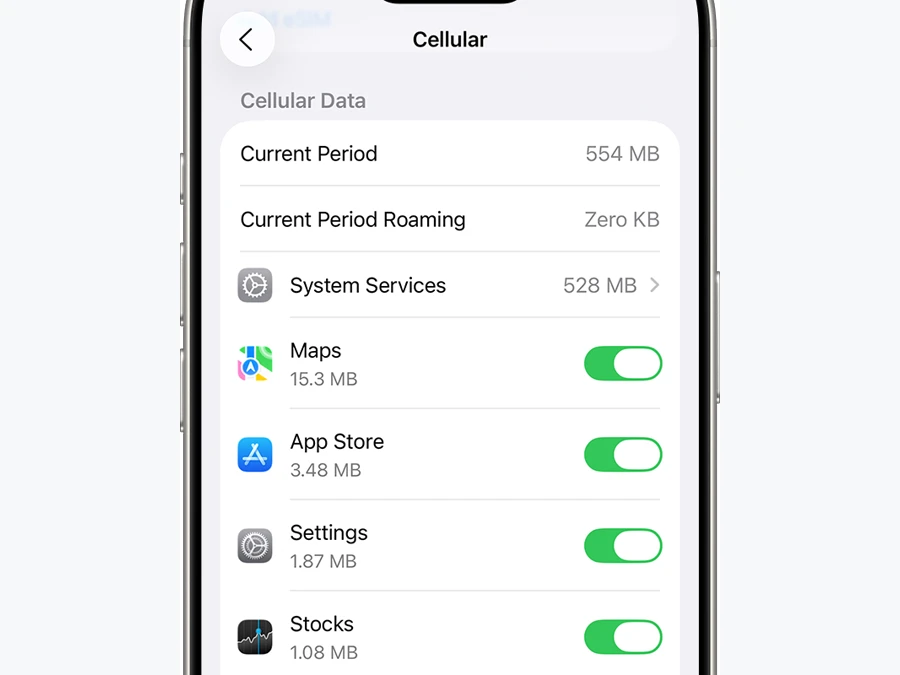
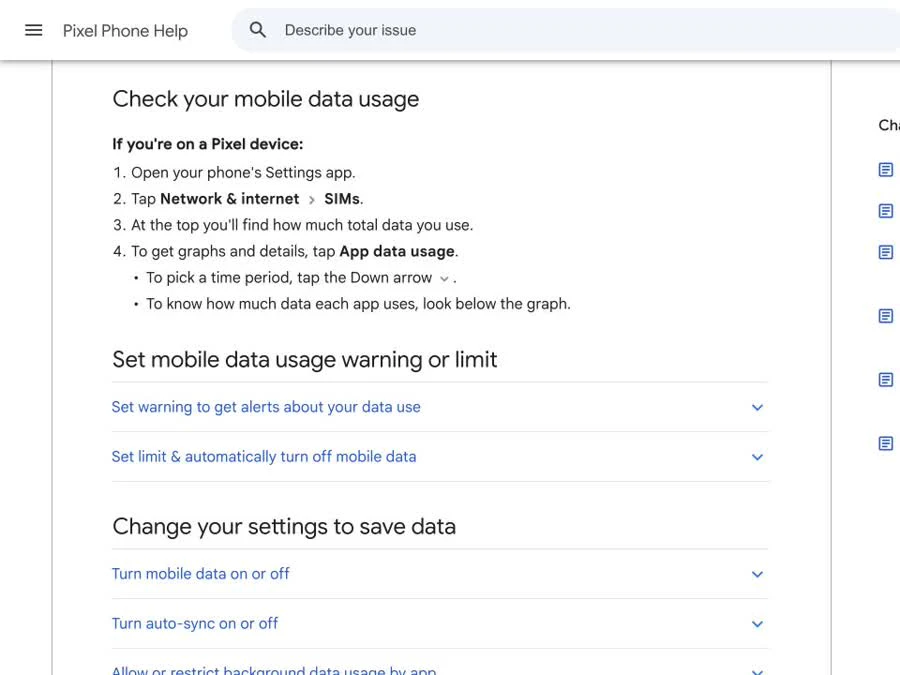
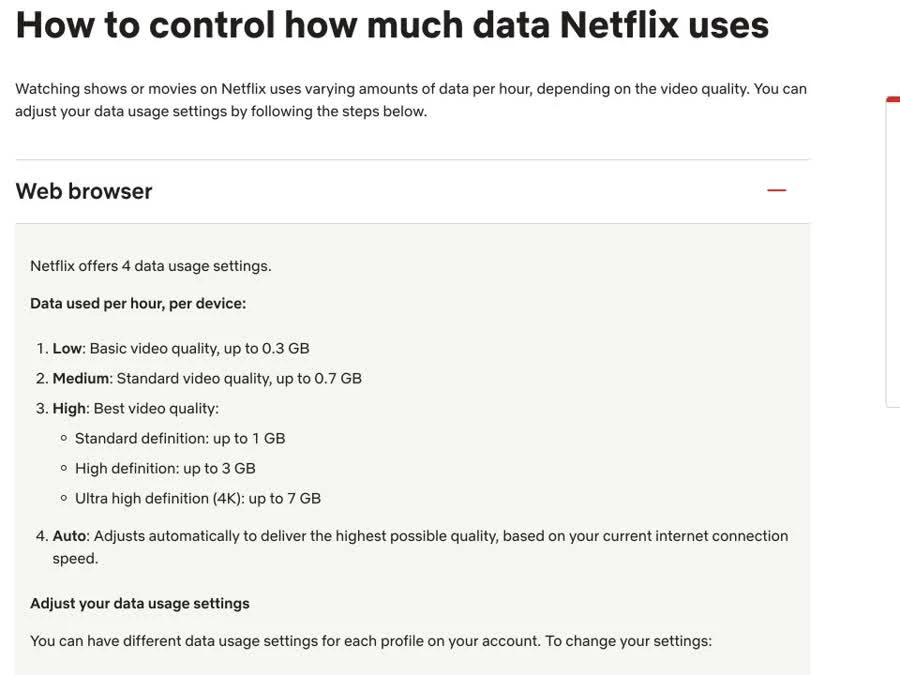
The first two slides show where iPhone and Pixel users can inspect real app-by-app usage. The third gives an official video benchmark: Netflix says its web playback settings can use up to 0.3 GB per hour at Low, 0.7 GB at Medium, 1 GB in standard definition, 3 GB in HD, and 7 GB in 4K. That range is why “I watch some video” is not enough information to size a plan.
Calculate the high-data parts first
Treat maps, transit, messaging, tickets, and ordinary browsing as your baseline band. Then add the activities that can dominate it.
For streaming, multiply the service's published hourly figure by the time you realistically expect to watch on mobile data. One hour of Netflix HD can use up to 3 GB, so even a light traveler becomes a heavy-use traveler on a day with two hours of HD playback. Download shows over trusted Wi-Fi before a long train ride if your service and accommodation setup allow it.
For uploads, check the actual file sizes on your phone. A 500 MB video starts with roughly 500 MB of payload, but protocol overhead, retries, and extra versions created by an app can make the mobile-data total higher. Automatic photo backup may also queue many files at once. Pause cloud photo and drive sync on mobile data if you do not want background uploads included in the trip allowance.
For tethering, count everything the connected device does. Apple explains that Personal Hotspot creates a Wi-Fi network using the iPhone or cellular iPad's mobile-data connection. A laptop can then use that allowance for operating-system updates, cloud sync, video meetings, and browser downloads, not only the task you opened it for. If tethering is essential for work, check that the plan permits hotspot use and choose a larger full-speed allowance.
Avoid precise “maps use X MB per hour” promises. Route complexity, map tiles, live traffic, satellite layers, voice guidance, and how much was cached already all change the total. For planning, maps belong in the light baseline; video and file transfer deserve their own calculation.
Use your own phone as the best estimator
Before buying, look at a recent day at home that resembles your trip. On iPhone, Apple says to open Settings → Cellular, scroll to the apps, and view the current-period statistics; you can reset those statistics before a test day. Apple also notes that your carrier's counter is the more accurate source for billing usage. On Pixel, Google's official instructions point to Settings → Network & internet → SIMs → App data usage, where you can choose a time period and see each app's total.
Run a one-day trial with Wi-Fi off only when it is safe and affordable on your home plan. Use the apps as you expect to in Korea, but add any travel-only behavior such as constant navigation, translation-camera use, and photo uploads. That result is more useful than another traveler's number because autoplay, camera settings, cloud backup, and screen habits differ widely.
Real traveler reports illustrate the spread. In one r/koreatravel discussion about 10 GB for 15 days, one commenter said 5 GB covered a 10-day Seoul stay, while another nearly used 10 GB in 10 days with constant use and uploads. A heavier social-media user reported exhausting 4 GB in three days. These are anecdotes, not benchmarks, but they support measuring your own behavior instead of copying a single average.
“Unlimited” is not one technical specification
Read the full-speed allowance, reduced speed, reset schedule, and hotspot rule—not only the word “unlimited.” Current Korean tourist plans show how different that word can be. As checked on August 10, 2026, KT's tourist eSIM page says users receive 11 GB each day and then continue at up to 5 Mbps until the allowance resets at midnight. LG U+'s tourist data eSIM page advertises unlimited LTE/5G without a speed cap or throttling, while noting that speeds may still be managed during excessive network congestion.
Those are examples, not a recommendation for either product. Terms can change, and third-party travel eSIMs using the same Korean network can have different fair-use rules. Check the exact product page you are buying on the day of purchase.
If you are still deciding between formats, compare coverage, phone-number needs, pickup, and device sharing in our Korea eSIM, SIM, and pocket Wi-Fi guide. If you are considering a data-only plan, read what it changes for calls, SMS, reservations, and emergencies in our data-only eSIM guide.
A simple purchase rule
Choose the smallest band that covers your normal busy day, then make sure one unusually heavy day will not leave you offline. For a total-data plan, multiply the band by the trip length and keep a modest reserve. For a daily-reset plan, compare the daily full-speed allowance with your heaviest planned activity. For an unlimited plan, verify reduced-speed and hotspot wording before paying.
After arrival, check the carrier's remaining-data page or app and your phone's app-by-app counter at the end of day one. If video, social feeds, or cloud backup is running higher than expected, lower playback quality or move uploads to Wi-Fi; if normal use is already close to the limit, top up or change plans before a transit-heavy day. Your first full day in Korea is the best final check on the estimate you made at home.
Image credits
- Daily data budget graphic: Delivery Spot.
- iPhone cellular-usage screen: Apple Support; used with written operator permission.
- Pixel mobile-data instructions: Google Pixel Phone Help; screenshot used with written operator permission.
- Netflix data-usage settings: Netflix Help Center; screenshot used with written operator permission.
Sources and image credits
- Netflix says — Checked for guide details or image attribution.
- Apple explains — Checked for guide details or image attribution.
- Google's official instructions — Checked for guide details or image attribution.
- r/koreatravel discussion about 10 GB for 15 days — Checked for guide details or image attribution.
- KT's tourist eSIM page — Checked for guide details or image attribution.
- LG U+'s tourist data eSIM page — Checked for guide details or image attribution.
- Apple Support — Checked for guide details or image attribution.
Last updated


