
Why the Same K-Drama Has Different Titles—and How to Find It
Match Korean dramas across Hangul, English and localized titles using release year, cast and official page codes—then check language and regional availability separately.

The title in a recommendation, the title in your streaming app, and the Korean title can all look different while pointing to the same drama. Do not translate one name back and forth and hope for a match. Save the Hangul title, the service's current display title, the release year, and one lead actor; if possible, keep the official page URL too.
First, separate the five kinds of title
- Original Korean title: the title used by the Korean broadcaster or distributor, written in Hangul—for example,
폭싹 속았수다. - Official international title: the name selected for distribution in another market, such as When Life Gives You Tangerines.
- Localized title: a market-specific title created for Japanese, Chinese, Thai, or another audience. It may not resemble the English name.
- Romanized title: Korean sounds written with Latin letters. Spelling and spacing can vary between databases and fan communities.
- Literal or fan translation: useful as a clue, but not proof of the title currently used by a licensed service.
The safest match is a bundle of facts: Hangul title, year, principal cast, broadcaster or platform, synopsis, episode count, and—when the official URL exposes one—the service's title code.
A creative English title can still be official
Netflix's Korean announcement explains that 폭싹 속았수다 comes from a Jeju expression meaning, in context, roughly “thank you for your hard work.” Netflix distributes the same drama internationally as *When Life Gives You Tangerines*. That English phrase carries the story's Jeju and life-season mood; it is not a word-for-word translation.
The match is still clear: Netflix's official pages identify the 2025 series, IU and Park Bo-gum, and title code 81681535. A creative title is therefore not a warning sign by itself. Confirm the surrounding identifiers instead.

One service can display a different title by market
Netflix's English-facing pages call title 81518991 Extraordinary Attorney Woo. The Japanese page for that same title code displays ウ・ヨンウ弁護士は天才肌. Both identify the 2022 series starring Park Eun-bin. Translating the Japanese title back into English is less reliable than checking the shared code, year, cast, and synopsis.
The display language can matter too. Netflix's current help page says a profile's display language can be changed separately from audio and subtitle preferences. If a friend can find a show but you cannot, compare the actual service page and profile language before concluding that the drama has vanished.
The Korean broadcaster and global platform may brand it differently
tvN's official program page uses 선재 업고 튀어, while its own URL contains Lovely-Runner. Viki displays *Lovely Runner* in English. The Korean title, 2024 release, leads Kim Hye-yoon and Byeon Woo-seok, and Viki content code 40466c together identify the drama much more reliably than any one translated phrase.

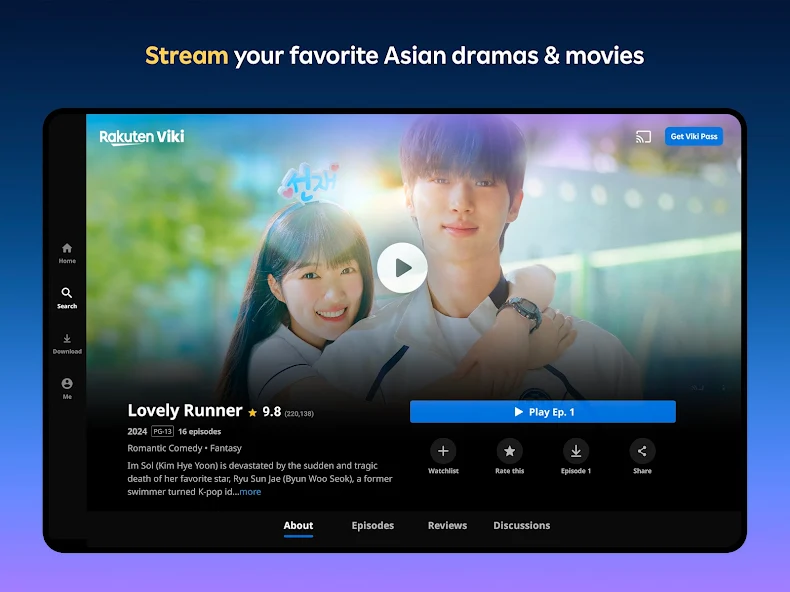
The two official presentations above are not competing answers. They are different labels attached to the same work.
Find the exact drama in five steps
1. Make a compact identity card
Write down:
- Hangul title;
- title shown in the recommendation or service;
- release year;
- one or two lead actors; and
- broadcaster, service, or official page URL.
For a remake, also add the production country and episode count. For a film-series collision, add the format.
2. Copy Hangul from a first-party page
Start with the Korean broadcaster, production company, or licensed streaming page. Do not machine-translate the English title to invent Korean search text. A marketing title may translate back to completely unrelated words.
Romanization helps with pronunciation, but it is a weaker search key. The National Institute of Korean Language's Romanization rules are based on Korean pronunciation; entertainment brands can still choose other spellings or spacing. Copying the Hangul avoids that ambiguity.
3. Search one title plus one hard identifier
Useful combinations include:
"폭싹 속았수다" Netflix 2025"When Life Gives You Tangerines" IU Park Bo-gum"선재 업고 튀어" tvN 2024"ウ・ヨンウ弁護士は天才肌" 81518991
On Naver, try the Hangul title plus 드라마, the broadcaster, or an actor's Korean name. Inside a streaming app, try its displayed title first, then Hangul, then a lead actor. Search results are clues; the final match should be the official detail page.
4. Compare the page, not just the search card
Check year, cast, synopsis, format, and episode count. If the official URL includes a numeric or alphanumeric content code, save the complete URL. Codes are especially useful when comparing language versions within the same service, but do not assume that unrelated services share one universal ID.
5. Check availability separately from identity
Finding the correct page does not guarantee that you can play it where you are. Netflix's current help guidance lists regional rights, release timing, profile maturity or title blocking, profile language, and VPN use among reasons a title may not appear. Viki likewise says regional availability depends on its license, and Viki Pass does not override that restriction.
Use the country selector or availability message on the licensed service rather than relying on an old search result. For legal services and region checks, see our K-drama streaming guide.
Three traps that waste the most time
- A remake shares the translated title. Add country, year, lead actor, and episode count.
- A film and series have similar names. Check format, runtime, and the official synopsis.
- A fan title is repeated as if official. Keep it as a search alias, then replace it in your notes with the title shown by the broadcaster or licensed service.
The most durable watchlist entry is not one perfect translation. Keep the Hangul title beside the service title, then add the year, one actor, and the official URL. That small identity card survives most language changes—and tells you whether you found the wrong work or merely a different label.
Sources and image credits
- Netflix — When Life Gives You Tangerines — Official title page and title code
81681535; original source of the cover image. - About Netflix — When Life Gives You Tangerines premieres March 7 — Official 2025 English title, cast, release, and key-art context; rechecked August 12, 2026.
- About Netflix Korea — 폭싹 속았수다 production announcement — Official explanation of the Jeju-dialect Korean title.
- Netflix Japan — ウ・ヨンウ弁護士は天才肌 — Japanese display title, 2022 release, cast, and title code
81518991. - tvN — 선재 업고 튀어 — Official Korean program page and original source of the tvN banner.
- Rakuten Viki — Lovely Runner — Official English-facing series page and content code
40466c. - National Institute of Korean Language — Romanization of Korean — Official pronunciation-based Romanization rules.
- Netflix Help Center — Can't find a TV show or movie — Current search-visibility reasons, including region, profile, language, and VPN conditions; rechecked August 12, 2026.
- Netflix Help Center — Change the language on Netflix — Current display-language and audio/subtitle settings.
- Viki Support — Not available in my region — Current licensing explanation and Viki Pass limitation.
- Netflix Media Center — 폭싹 속았수다 — Original source of the Korean poster image.
- Rakuten Viki — Google Play listing — Original source of the Viki app image.
- Delivery Spot cover image file — Existing When Life Gives You Tangerines key art credited to Netflix.
- Delivery Spot Korean-poster image file — Existing Korean poster credited to Netflix Media Center.
- Delivery Spot tvN-banner image file — Existing
선재 업고 튀어banner credited to tvN / CJ ENM. - Delivery Spot Viki-app image file — Existing Lovely Runner app view credited to Rakuten Viki.
Last updated


