
Can You Travel Korea Using Only Public Wi-Fi?
Public Wi-Fi can cover a short, tightly planned stay, but most independent trips need a connection that works between hotspots. See when Wi-Fi-only is realistic and what to save offline.

For most independent trips, no: Korea’s public Wi-Fi works well as backup data, but it is too fragmented to be the only connection you must rely on. A short, tightly planned stay can work without a SIM or eSIM if you save each route, address, ticket, and QR code before leaving reliable Wi-Fi—and keep an emergency connection available.
The problem is not that Korea lacks free Wi-Fi. It is that the moments when you most need data often happen between access points: after the wrong station exit, at a changed taxi pickup point, or while retrieving a booking approval screen.
Decide by trip type
- Reasonable without mobile data: a layover or short stay based around one hotel and one neighborhood, with every important route and booking saved offline.
- Possible but inconvenient: a multi-neighborhood city trip where you are comfortable stopping to reconnect and someone in the group can share a hotspot.
- Not a good default: solo travel, frequent intercity moves, late arrivals, changing plans, or any itinerary that depends on live buses, taxis, translation, and mobile bookings.
For the last two cases, even a small data eSIM or limited roaming allowance is usually worth more than the time lost looking for the next hotspot.
Where free Wi-Fi works—and where coverage ends
Korea has a government-backed public Wi-Fi program. The official Public WiFi Korea service guide lists community centers, welfare facilities, traditional markets, city buses, and other public facilities. Seoul’s English Wi-Fi guide describes coverage on major streets, at tourist sites, parks, markets, bus stops, welfare facilities, and city buses.
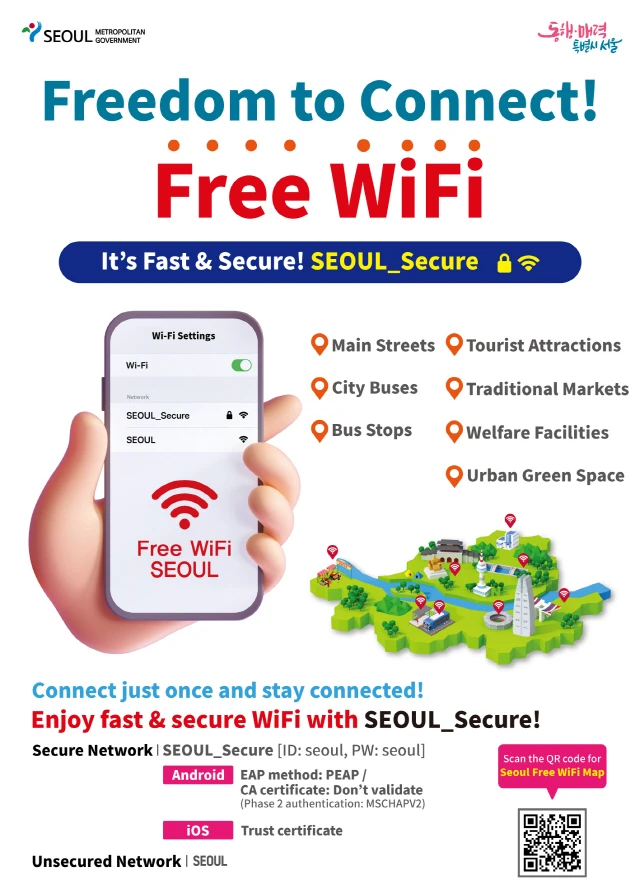
The official Seoul poster shows the city network names and typical installation locations. It is a coverage guide, not a promise of one continuous signal across the city.
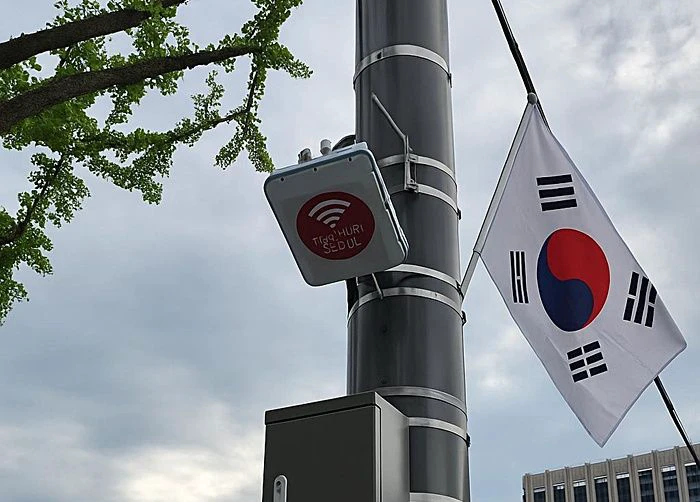
A street access point is useful while you remain within its range. The Seoul installation pictured above was reported through Dailian on Naver News. Moving down a side street or into another operator’s area can require selecting a new network and reopening a connection page.
The national FAQ adds two practical limits: access quality can fall when many people share an access point, and the open Public WiFi Free session is disconnected after one hour, although users may reconnect without a stated count limit. Check the current Public WiFi Korea FAQ if your plan depends on a long session.
Even onboard Wi-Fi can vary along a route. In one 2025 Korean KTX user report, the writer described interruptions in tunnels and slower loading with many passengers connected. That is one person’s experience, not a network-wide test, but it shows why a connection at departure should not be treated as guaranteed for the whole ride.
The five moments Wi-Fi-only travel breaks down
- Live maps: saved screenshots can show a planned route, but a wrong turn, changed bus arrival, or new Korean address needs a connection.
- Taxi pickup: calling a taxi and confirming a moved pickup point both happen outside the hotel network.
- Reservations and tickets: a barcode, QR code, confirmation page, or last-minute cancellation may need to reload.
- Translation and messages: offline packs cover basic translation, but not a new host message or an image you suddenly need interpreted.
- Online payment approval: the merchant’s physical card terminal normally does not use your phone data; the problem begins when the transaction opens a bank app, browser, or identity step on your device.
Do not assume a station, shop, or restaurant will offer guest Wi-Fi at the exact moment one of those steps appears.
Traveler outcomes therefore vary. In a discussion about relying on Wi-Fi in Seoul and Busan, some people said careful preparation made it workable, while others found maps and translation unreliable without mobile data. These are firsthand reports, not a coverage survey. Your route and willingness to stop and reconnect matter more than another traveler’s total data use.
Use the secure network when it is available
The official instructions rechecked on August 11, 2026 distinguish the following network types:
- Public WiFi Free: the national open network. Select it, open a browser, and complete the connection page. The official guide advises against handling important personal information or financial transactions on it.
- Public WiFi Secure: the encrypted national option where available. The official secure-use guide lists
wifias both the username and password. Android’s system-certificate instructions listwifisecure.kras the domain. - SEOUL: Seoul’s open city network.
- SEOUL_Secure: Seoul’s secure network. The city page lists
seoulas both the username and password.
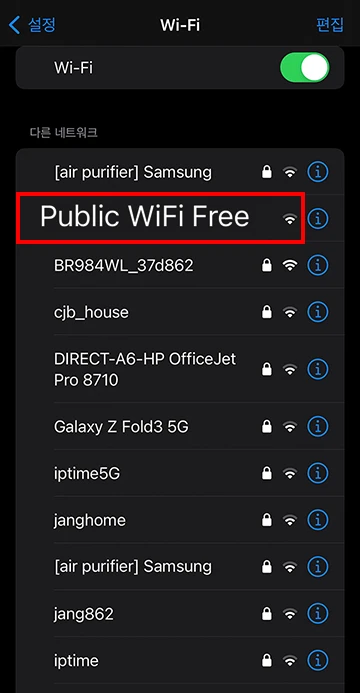
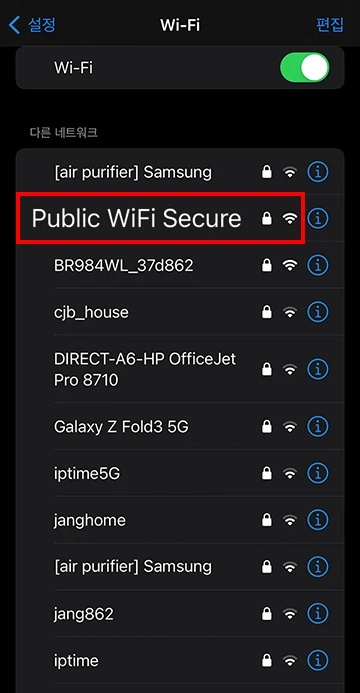
The official iPhone examples show the open network without a lock and the secure network with one. A secure label still does not remove every risk: the national guidance says encryption covers the link between your device and the access point, while phishing and other routes can still expose information.
Confirm the provider and exact network name, especially when several similar names appear. Do not install an unexpected profile or certificate merely because a pop-up asks. Turn off auto-join after use so the phone does not silently reconnect to a copied network name later.
Prepare this offline pack before leaving the hotel
- the next stop’s exact Korean name, road address, and phone number;
- screenshots of the walking route, station exit, building, and entrance;
- accommodation address and a contact number in plain text;
- transport tickets, reservation details, barcodes, and QR codes saved on the device;
- an offline Korean translation pack;
- the next two handoffs in the journey, not only the final destination; and
- one emergency connection already tested on the phone.
That emergency option can be a small eSIM, roaming left disabled until needed, or a companion’s agreed hotspot. Install and verify it while hotel Wi-Fi is working. Trying to download or activate the backup only after you are stranded defeats its purpose.
For most independent travelers, public Wi-Fi is excellent for conserving data, uploading photos, and doing non-urgent tasks. Treat it as a supplement. The connection you depend on for the wrong exit, the late taxi, or a changed booking should follow you between hotspots.
Sources and image credits
- Delivery Spot cover image file — Web-ready smartphone and city-skyline cover image used by this guide.
- Public WiFi Korea — Service guide — Official locations, Public WiFi Free connection steps, and warning on sensitive or financial activity; rechecked August 11, 2026.
- Public WiFi Korea — Secure-use guide — Official Public WiFi Secure credentials, platform setup, encryption scope, and phishing caution; rechecked August 11, 2026.
- Public WiFi Korea — FAQ — Official range, congestion, one-hour open-session, and reconnection guidance; rechecked August 11, 2026.
- Public WiFi Korea — English landing page — National service entry point retained for pre-trip checks.
- Seoul Metropolitan Government — Seoul Free WiFi — Official network names, credentials, common installation areas, and original poster source; rechecked August 11, 2026.
- Dailian on Naver News — Seoul public Wi-Fi access point — Source page for the pictured Seoul street access point.
- Naver Blog — One passenger’s 2025 KTX Wi-Fi report — Individual experience used only to illustrate possible onboard variability.
- Reddit — Wi-Fi-only travel discussion — Individual traveler reports used only to compare planning tolerance.
- Delivery Spot — Seoul Free Wi-Fi poster — Published web asset from the credited Seoul Metropolitan Government guide.
- Delivery Spot — Seoul street access point — Published web asset from the credited Dailian/Naver News report.
- Delivery Spot — Public WiFi Free iPhone example — Published web asset from the credited national service guide.
- Delivery Spot — Public WiFi Secure iPhone example — Published web asset from the credited national secure-use guide.
Last updated


