
Why Your Foreign Card Works in Korea Offline but Fails Online
A store approval does not prove a Korean website accepts overseas cards. Use the payment screen, authentication step, and browser behavior to find where the failure happens.

A foreign card can work at a Korean shop and still fail on a Korean website because the two payments may use different processing routes. Online failure usually comes from the merchant’s payment setup, a Korean account-verification gate, the card issuer’s 3-D Secure check, or a blocked browser handoff.
Start with the point where it fails
The fastest diagnosis is to note the last screen that worked. A successful tap or chip payment only confirms that the store’s terminal and your issuer approved that in-person transaction. It says nothing about whether a website has enabled overseas-issued cards.
No “Foreign card” or “International card” choice: The merchant and its payment gateway (PG) are probably offering only a domestic card route. A Visa or Mastercard logo on the card does not make that route international.
A Korean mobile number or resident-name check appears before card entry: This is usually an account, membership, or local-payment eligibility check. It is not a decline from your card issuer.
The issuer’s password or one-time-code page opens, then rejects the payment: The transaction reached 3-D Secure. The issuer, authentication enrollment, or one-time-code delivery is now the likely issue.
A blank page, frozen spinner, or loop appears after you click Pay: The redirect between the merchant, payment gateway, and issuer may have been interrupted by the browser.
The payment screen reveals the route
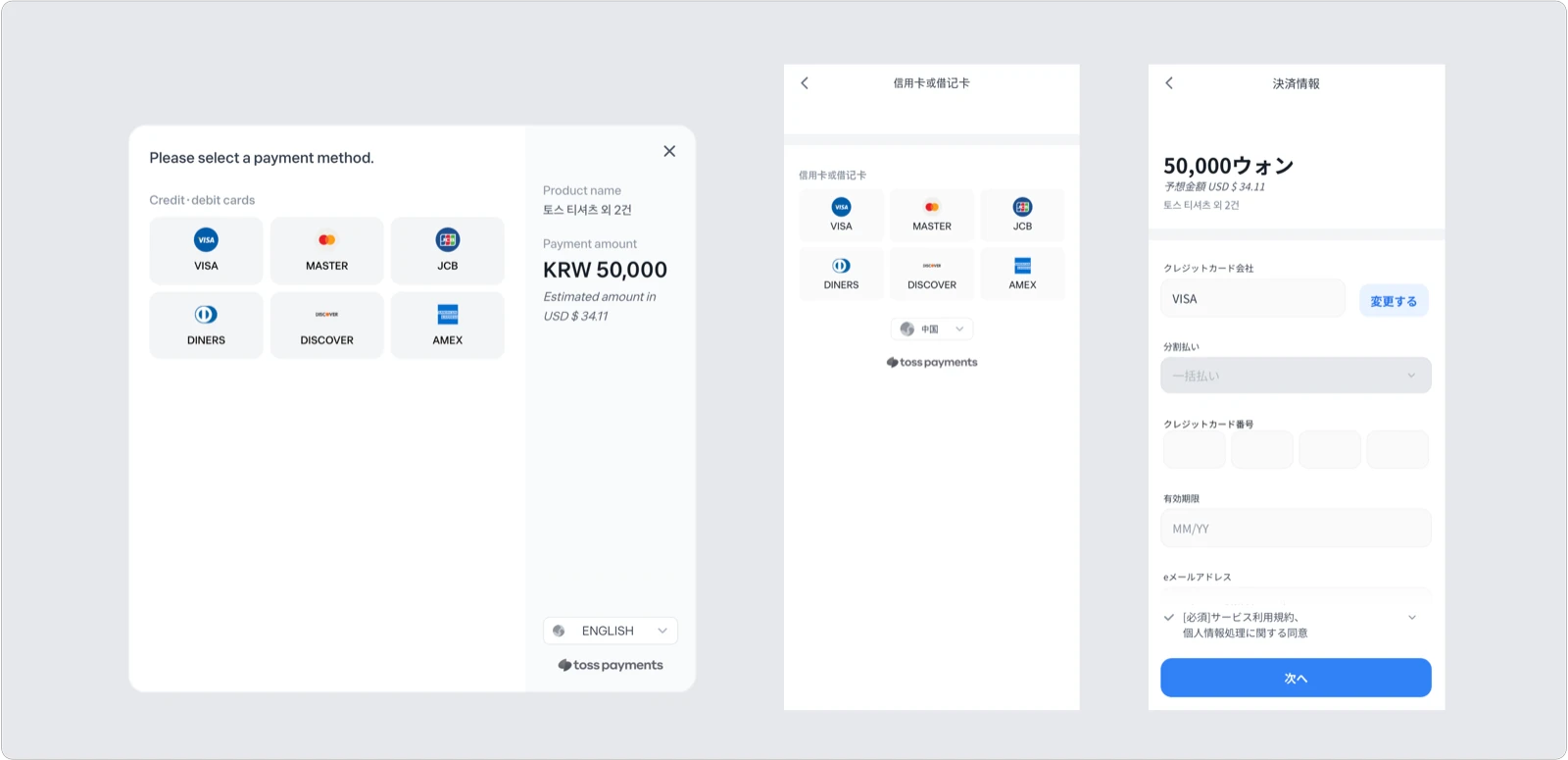
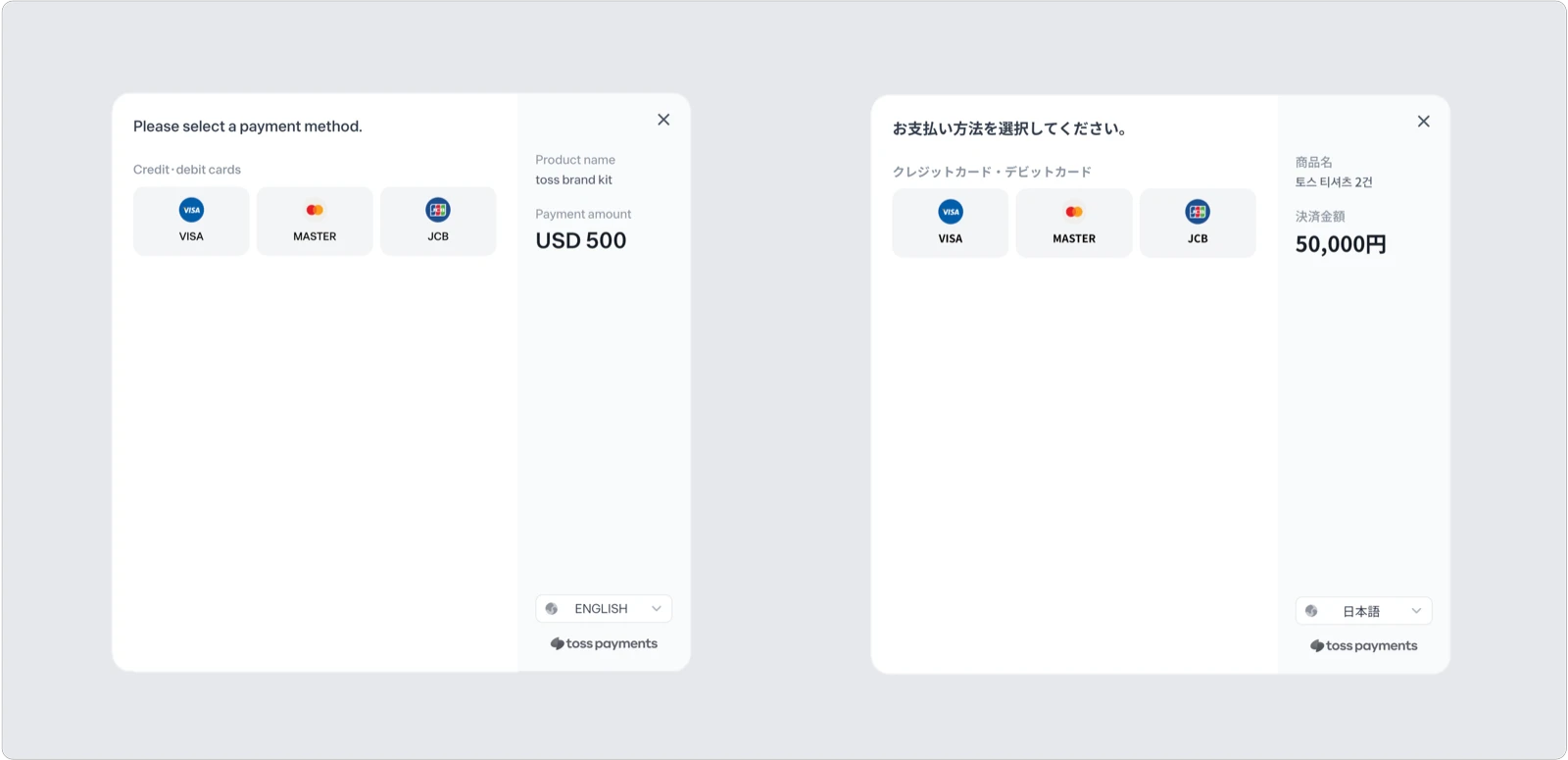
A working international-card screen normally says something like “Foreign card,” “International card,” or “Global card,” then shows supported card brands. It may charge in Korean won or, when the merchant has arranged it, another currency. Toss Payments explains that overseas-issued cards travel through international card-brand networks, while domestic Korean card payments use a different local path.
This is why the ordinary button labeled “Credit card” can be misleading. If it opens a list of Korean card companies, app-card services, or local certificate options, go back and look for the merchant’s global site, English checkout, or a separately labeled overseas-card option. If none exists, changing browser settings cannot add foreign-card acceptance that the merchant did not configure.
Korean identity checks and 3-D Secure are different
A Korean website may ask for a name and Korean mobile number to verify an account, an age-restricted purchase, or eligibility for a local service. That check belongs to the website or its Korean workflow. A foreign card cannot satisfy it simply because the card itself is valid.
3-D Secure is card authentication. Visa says the protocol exchanges data among the merchant and issuer and, when needed, the cardholder to confirm that the rightful account owner initiated the purchase. Toss Payments describes the visible flow as payment window, issuer authentication page, then completion.
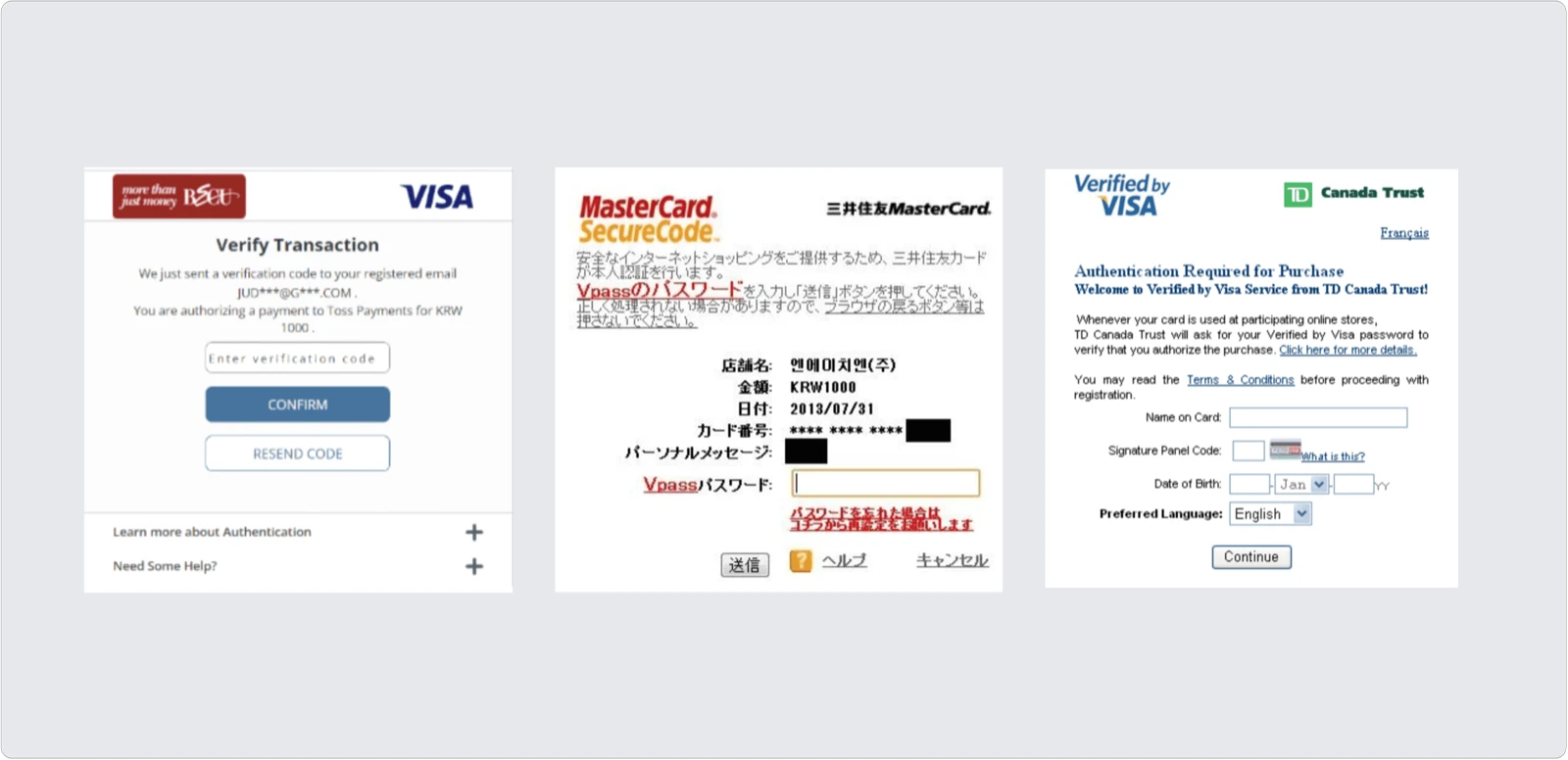
These are examples of issuer handoffs, not a preview of every current screen; branding and challenge methods vary by issuer. The authentication screen belongs to the bank or company that issued your card. It may ask for an app approval, password, or one-time code. If you cannot receive the code abroad, the card is not enrolled, or the issuer rejects the authentication, the Korean merchant usually cannot override it.
If the page goes blank or loops
Open the merchant page in a current standalone browser instead of an in-app browser inside a messenger or social app. Start a fresh checkout, and allow pop-ups and redirects for that merchant only if the browser shows they were blocked. Google’s Chrome help notes that legitimate sites can use pop-up windows and provides site-specific permission controls.
Also try pausing automatic translation, content blockers, or a VPN for one attempt. Change one thing at a time so you can tell what fixed the handoff. Do not keep resubmitting if the order page is unclear; first check whether an order or authorization already appears.
What to try, in order
- Use the merchant’s official global or English page and select an option explicitly labeled for foreign or international cards.
- Retry from a fresh cart in an updated standalone browser, with pop-ups and redirects allowed only for that site.
- Open your issuer’s app or contact the issuer to confirm that online, international, and card-not-present purchases are enabled and that 3-D Secure can reach you.
- If the merchant supports the network, try a second card from a different issuer. A card from another issuer can behave differently even when it uses the same network.
- If it still fails, give the merchant the time, amount, payment method, and exact error text. Give the issuer the merchant name and attempted amount. Never send a full card number, CVC, password, or one-time code in a support message.
Travelers report every variation of this problem: some reach the issuer page and get a blank result, while others succeed only after switching the purchase channel. Those reports are useful clues, not proof that one workaround will work for every bank or merchant.
If the checkout never offers an international-card route, the practical answer is usually to use the seller’s official global channel, choose another payment method the same merchant explicitly offers, or buy from another authorized seller. Your card working at a physical terminal does not change the website’s payment contract.
Facts and links checked on August 11, 2026.
Sources and image credits
- Toss Payments: International payments explained — overseas-card processing, supported networks, KRW and multi-currency screens, and 3-D Secure flow
- Visa Secure with EMV 3-D Secure — issuer authentication and card-not-present transaction context
- Google Chrome Help: Block or allow pop-ups — site-specific pop-up and redirect controls
- Reddit: KoRail payment problems for foreign cards — traveler-reported blank-screen and 3-D Secure symptoms
- Pexels: Person holding a credit card near a laptop — photo by Leeloo The First, discovered through Naver Images
- Pexels: Contactless payment with a credit card — featured photo by Towfiqu barbhuiya, discovered through Google Images
- Pexels License — free use and modification terms for the two photographs


